# Matrica

The Community Layer of Web3

Welcome to Matrica, the all-in-one community management solution. Our token verification and questing solutions can be found across 8 different blockchains and counting.

<figure><img src="https://2946875910-files.gitbook.io/~/files/v0/b/gitbook-x-prod.appspot.com/o/spaces%2FLywT3slSQ4GoAk6k17dV%2Fuploads%2FbC3amMOLx27Y3yOsLMZQ%2FMatrica%20Chains.png?alt=media&amp;token=afa2bf70-0ade-47d0-aac5-4a18a801120d" alt=""><figcaption></figcaption></figure>

**Supported Chains:**

* **Solana**
* **Bitcoin**
* **Ethereum**
* **Polygon**
* **Eclipse**
* **Base**
* **Monad**
* **ApeChain**

\
To view all the features available with Matrica, please check our Pricing Guide here:

{% content-ref url="/pages/En3fYgbC61PPrtmuiV34" %}
[Pricing Guide](/guides/pricing-guide)
{% endcontent-ref %}

### Guides

Follow our guides to get started:

{% content-ref url="/pages/KBie2MbyW6dtphpt2MW2" %}
[User Guide](/guides/user-guide)
{% endcontent-ref %}

{% content-ref url="/pages/1fEhZpE9BcizgcjmhiPf" %}
[Community Guide](/guides/community-guide)
{% endcontent-ref %}


# Pricing Guide

Breakdown of Plans, Features and Pricing offered by Matrica

<figure><img src="https://2946875910-files.gitbook.io/~/files/v0/b/gitbook-x-prod.appspot.com/o/spaces%2FLywT3slSQ4GoAk6k17dV%2Fuploads%2FMTeq6AJBytU4cYDaPRcD%2Fimage.png?alt=media&amp;token=9e49ef9e-9d0c-4d31-ac73-d7afe22e02ae" alt=""><figcaption></figcaption></figure>

Matrica offers 3 different plan levels, **Premium, Pro, and Enterprise**. Delivering high-impact solutions, to allign your goals with your community's needs. <br>

**Supported Chains:**

* **Solana**
* **Bitcoin**
* **Ethereum**
* **Polygon**
* **Eclipse**
* **Base**
* **Monad**
* **ApeChain**

\
\
**Payments can be made via Stripe or Crypto.**&#x20;

## **Premium - get your community started**

*Price -* **$99/month** or **$899/year (Save $289)**

## **Pro - for serious builders**

*Price* **$199/month** or **$1750/year (Save $638)**

## **Enterprise Plan** &#x20;

[Book a call with the Matrica Team to learn more](https://calendly.com/MatricaLabs)

<table><thead><tr><th width="452">Features</th><th width="88" data-type="checkbox">Basic</th><th width="98" data-type="checkbox">Premium</th><th data-type="checkbox">Enterprise</th></tr></thead><tbody><tr><td>Discord Holder Verification</td><td>true</td><td>true</td><td>true</td></tr><tr><td>Discord Sales Bot</td><td>true</td><td>true</td><td>true</td></tr><tr><td>Multi-Collection Support</td><td>true</td><td>true</td><td>true</td></tr><tr><td>Event Management System</td><td>true</td><td>true</td><td>true</td></tr><tr><td>Dedicated Customer Support</td><td>true</td><td>true</td><td>true</td></tr><tr><td>Attribute &#x26; Amount Based Roles</td><td>false</td><td>true</td><td>true</td></tr><tr><td>Telegram Gating</td><td>false</td><td>true</td><td>true</td></tr><tr><td>Bitcoin Ordinals &#x26; Runes Verification</td><td>false</td><td>true</td><td>true</td></tr><tr><td>Fungible Token Support (SPL, ERC-20, BRC-20)</td><td>false</td><td>true</td><td>true</td></tr><tr><td>Collection/User Snapshots</td><td>false</td><td>true</td><td>true</td></tr><tr><td>Custodial NFTs Tracking (Staked, Loaned, Rented)</td><td>false</td><td>true</td><td>true</td></tr><tr><td>Verified Collection Roles</td><td>false</td><td>true</td><td>true</td></tr><tr><td>Compressed NFT Support (cNFTs)</td><td>false</td><td>true</td><td>true</td></tr><tr><td>Matrica Connect</td><td>false</td><td>false</td><td>true</td></tr><tr><td>API Access</td><td>false</td><td>false</td><td>true</td></tr><tr><td>Faster Verification Bots</td><td>false</td><td>false</td><td>true</td></tr><tr><td>Dedicated Developer Support</td><td>false</td><td>false</td><td>true</td></tr><tr><td>Co-Marketing / Advertisements</td><td>false</td><td>false</td><td>true</td></tr></tbody></table>

***

***

## Add-Ons

*\*Billed in addition to the subscription plan*

* **Role Limit Increase**: $15/month per 10 Token Gated Roles (20 Roles included in Premium)
* **Multi-Telegram Groups**: $15/month per group (1 Group included in Premium)
* **Snapshot Plus** - **Discord/Twitter IDs Included in Snapshot** : Additional $99 per month


# User Guide

Welcome! This guide will walk you through setting up your Matrica profile. This is a one time process. Once you have completed your profile, you will automatically be verified on all Matrica-enabled servers and quests!

<figure><img src="https://2946875910-files.gitbook.io/~/files/v0/b/gitbook-x-prod.appspot.com/o/spaces%2FLywT3slSQ4GoAk6k17dV%2Fuploads%2FQOIJH0tCkzWTXDWIOCgn%2Flandingpage.png?alt=media&amp;token=35ea6d0e-448d-4dce-b7fe-17aab62f3c8c" alt=""><figcaption></figcaption></figure>

{% content-ref url="/pages/BahUL2jWQonvGhp65STY" %}
[Getting Started](/guides/user-guide/getting-started)
{% endcontent-ref %}

{% content-ref url="/pages/AVcseJKmxjr4OVPIofib" %}
[Linking Wallets](/guides/user-guide/linking-wallets)
{% endcontent-ref %}

{% content-ref url="/pages/hw0abCEWvAnWzW995JJ1" %}
[Customizing Your Profile](/guides/user-guide/customizing-your-profile)
{% endcontent-ref %}

{% content-ref url="/pages/tTeZQtEvprOUeAwfxJJj" %}
[Bot Commands](/guides/user-guide/bot-commands)
{% endcontent-ref %}


# Getting Started

<figure><img src="https://2946875910-files.gitbook.io/~/files/v0/b/gitbook-x-prod.appspot.com/o/spaces%2FLywT3slSQ4GoAk6k17dV%2Fuploads%2FOt8k3iUnFz8frZefBIQz%2FBusiness.png?alt=media&amp;token=afa6bb6f-74da-4f68-b871-78056e8679b4" alt=""><figcaption></figcaption></figure>

**First, go to** [**https://matrica.io.**](https://matrica.io./) **From there, follow these steps:**

1. Click “Connect”
2. Connect the wallet which contains your Tokens you’d like to verify. Once you have signed up, you can link as many additional wallets as you would like under Settings.\
   ![](https://2946875910-files.gitbook.io/~/files/v0/b/gitbook-x-prod.appspot.com/o/spaces%2FLywT3slSQ4GoAk6k17dV%2Fuploads%2FJf8X2SvHJzH4e9eHtfX2%2Fimage.png?alt=media\&token=d2b85c65-7bb3-404b-9451-51b5a7040749)
3. Click sign message to verify ownership of the wallet. If you are using Ledger, toggle the “Using Ledger” option on. Ledger users must send a transaction to themselves to verify.\
   ![](https://2946875910-files.gitbook.io/~/files/v0/b/gitbook-x-prod.appspot.com/o/spaces%2FLywT3slSQ4GoAk6k17dV%2Fuploads%2FVRmwtfr212GbWssJs2Qd%2Fimage.png?alt=media\&token=48808f62-5220-4410-802f-0d7be2a2b8d7)<br>
4. Link your Discord/Telegram by clicking the button. You will be redirected to Discord/Telegram to confirm your account. Afterwards you will be send back to Matrica. \
   ![](https://2946875910-files.gitbook.io/~/files/v0/b/gitbook-x-prod.appspot.com/o/spaces%2FLywT3slSQ4GoAk6k17dV%2Fuploads%2F4knd8ww0xUWNvztvKBU6%2Fimage.png?alt=media\&token=04d76ac9-d00c-420b-8be8-8fe2e6637d1d)
5. Next, now link all your wallets under Settings, and select your preferred Reward wallets on each chain in the Airdrops tab. You are now fully registered with Matrica!\
   ![](https://2946875910-files.gitbook.io/~/files/v0/b/gitbook-x-prod.appspot.com/o/spaces%2FLywT3slSQ4GoAk6k17dV%2Fuploads%2FXkzUsj7yaKfKy5sXcZQx%2Fimage.png?alt=media\&token=07830677-af64-4c0a-b29f-8eaacabc0baf)

{% hint style="warning" %}
Make sure you are linking the correct Discord/Telegram. You may be logged into a different Discord/Telegram account on the browser version.
{% endhint %}


# Linking Wallets

In the **"Settings"** tab, you will need to connect all your wallets to your profile. This will allow you to seamlessly get roles assigned across Discords, Telegrams, and Quests powered by Matrica.

To link a wallet click the **“Add Wallet”** ico&#x6E;**.**

This will prompt you to sign an **off-chain** message with your wallet one-time.&#x20;

{% hint style="warning" %}
Note: Signing an off-chain message won't give Matrica access to your wallet. It is only used to verify ownership.
{% endhint %}

<figure><img src="https://2946875910-files.gitbook.io/~/files/v0/b/gitbook-x-prod.appspot.com/o/spaces%2FLywT3slSQ4GoAk6k17dV%2Fuploads%2FUG1UhA5j8jCkvOJskAoc%2FScreenshot%202025-03-31%20at%201.32.32%E2%80%AFPM.png?alt=media&amp;token=1ce1b5d5-ee09-4db5-8932-f7eef6a65d83" alt=""><figcaption></figcaption></figure>


# Linking Socials

In the "**Settings**" tab, under 'General', you will also need to link your social accounts like Discord, X, Telegram, and Email.&#x20;

<figure><img src="https://2946875910-files.gitbook.io/~/files/v0/b/gitbook-x-prod.appspot.com/o/spaces%2FLywT3slSQ4GoAk6k17dV%2Fuploads%2FrU3XVCooWE1RvELonLjD%2Fmatrica-social-1.png?alt=media&amp;token=c50a1cf5-2f97-4901-8848-640814edd9e2" alt=""><figcaption></figcaption></figure>

**Discord** - To be assigned your roles in any communities' server, you must link your Discord account. Once the Discord account and your wallets are linked, you will receive your roles automatically for all servers and Quests powered by Matrica.

**X** - Linking your X profile creates a seamless connection on platforms using Matrica. This will be featured on your profile page.&#x20;

**Telegram** - Linking your Telegram account will grant you access to Matrica token gated community group chats on Telegram, if you meet the requirements set up by the community.&#x20;

**Email** - Verifying an Email address with your Matrica profile will complete your social registration to participate in Quests where these informations are required.<br>

<figure><img src="https://2946875910-files.gitbook.io/~/files/v0/b/gitbook-x-prod.appspot.com/o/spaces%2FLywT3slSQ4GoAk6k17dV%2Fuploads%2F8dIwCkx6HfjIOHo4f4lb%2Fimage.png?alt=media&amp;token=ec68388f-1948-4b8d-adc0-5e25b665ae6f" alt=""><figcaption></figcaption></figure>


# Airdrops

{% hint style="warning" %}
Note: All users need to select their reward wallets across all chains, to be eligible for Whitelist and Airdrop campaigns.&#x20;
{% endhint %}

Once you have connected all your wallets and socials, you have to select your preferred Airdrop wallet on each chain, so you don't miss out on any potential reward.

<figure><img src="https://2946875910-files.gitbook.io/~/files/v0/b/gitbook-x-prod.appspot.com/o/spaces%2FLywT3slSQ4GoAk6k17dV%2Fuploads%2FXkzUsj7yaKfKy5sXcZQx%2Fimage.png?alt=media&amp;token=07830677-af64-4c0a-b29f-8eaacabc0baf" alt=""><figcaption></figcaption></figure>


# Customizing Your Profile

If you would like to customize your profile, click the “S**ettings**” and select **"Profile"** tab. From here you can set your Display Name, Vanity URL, and customize your Banner settings.

To set your PFP or Banner, simply click on the search bar and type in the name of an NFT you own and choose it under “Select new Banner” or “Select new PFP”. <br>

<figure><img src="https://2946875910-files.gitbook.io/~/files/v0/b/gitbook-x-prod.appspot.com/o/spaces%2FLywT3slSQ4GoAk6k17dV%2Fuploads%2FpeuJaftl1RGbxrqkAs9q%2Fimage.png?alt=media&amp;token=1c4fb2a9-002b-4b9c-b685-28bdcc74101f" alt=""><figcaption></figcaption></figure>


# Bot Commands

In each Matrica gated Discord server, the following bot commands are available to provide you information about the server and for troubleshooting:

`/roles` - Seamlessly discover real-time information on server roles \
`/wallets` - Discover your Matrica-connected wallets \
`/floor` - Instantly retrieve floor prices of various collections \
`/refresh` **-** Refresh user wallet functions \
`/help` **-** Get a live view of your collection holdings with a link to Matrica Support Staff&#x20;

<figure><img src="https://2946875910-files.gitbook.io/~/files/v0/b/gitbook-x-prod.appspot.com/o/spaces%2FLywT3slSQ4GoAk6k17dV%2Fuploads%2FpPAcntLBogY02TQeTbx2%2FGroup%201444.png?alt=media&amp;token=130108ff-c5ca-4c62-93dc-40976d701e5a" alt=""><figcaption></figcaption></figure>


# Privacy Settings

To adjust the privacy settings of your profile, click the “S**ettings**” and select **"Privacy"** tab. \
\
From here, you can:

* Hide your profile information in the Sales bot&#x20;
* Allow specific communities to access your profile information&#x20;
* Redirect wallet pages to your profile page<br>

  <figure><img src="https://2946875910-files.gitbook.io/~/files/v0/b/gitbook-x-prod.appspot.com/o/spaces%2FLywT3slSQ4GoAk6k17dV%2Fuploads%2F1C8qtp2s1MFCccQjM75t%2Fimage.png?alt=media&amp;token=64594ec5-cf8a-4df6-9f8b-03218dd65145" alt=""><figcaption></figcaption></figure>

{% hint style="warning" %}
By making your profile private, you could be excluded from potential Airdrops/Rewards.
{% endhint %}

*


# /flash

Showcase any Token, NFT or Rune to the Telegram chat, data verified by Matrica.

* Works across BTC, Solana, and EVM

{% embed url="<https://www.youtube.com/watch?v=2FrcCbEBo1c>" %}

To use **/flash** in a Telegram group that has the Matrica bot, make sure your Telegram account is linked to your Matrica profile:

{% content-ref url="/pages/xVMCICYPECzFTf3rIaM8" %}
[Linking Socials](/guides/user-guide/linking-socials)
{% endcontent-ref %}

For additional help using the **/flash** command, try "**/help flash"** for an informative message regarding the functionality and formatting to flash certain holdings:

<figure><img src="https://2946875910-files.gitbook.io/~/files/v0/b/gitbook-x-prod.appspot.com/o/spaces%2FLywT3slSQ4GoAk6k17dV%2Fuploads%2FpgBfcRiscw95TYT7wueP%2FScreenshot%202024-11-20%20at%2012.24.40%E2%80%AFPM.png?alt=media&amp;token=b9e53087-fbc2-438f-8dc4-614ea130e2fe" alt=""><figcaption></figcaption></figure>


# Community Guide

Welcome to Matrica Business!

## [Matrica Business](https://business.matrica.io/)

<figure><img src="https://2946875910-files.gitbook.io/~/files/v0/b/gitbook-x-prod.appspot.com/o/spaces%2FLywT3slSQ4GoAk6k17dV%2Fuploads%2FMTeq6AJBytU4cYDaPRcD%2Fimage.png?alt=media&amp;token=9e49ef9e-9d0c-4d31-ac73-d7afe22e02ae" alt=""><figcaption></figcaption></figure>

{% content-ref url="/pages/gD6CSPF7srNfpMUUeaOH" %}
[Getting Started](/guides/community-guide/getting-started)
{% endcontent-ref %}

{% content-ref url="/pages/rYXedYTFRxDQGHAMb9OR" %}
[Manage Community](/guides/community-guide/manage-community)
{% endcontent-ref %}

{% content-ref url="/pages/mNuluvoNlblC5LTtn6r2" %}
[Manage Collections](/guides/community-guide/manage-collections)
{% endcontent-ref %}

{% content-ref url="/pages/Fgf1jHYQ6UyfaWuvWRE2" %}
[Discord Set-Up](/guides/community-guide/discord-set-up)
{% endcontent-ref %}

{% content-ref url="/pages/JmkDCpfBcQ9nPiExg5xI" %}
[Verification](/guides/community-guide/verification)
{% endcontent-ref %}

{% content-ref url="/pages/cMCftFFly6DBS37ScxjF" %}
[Telegram Set-Up](/guides/community-guide/telegram-set-up)
{% endcontent-ref %}

{% content-ref url="/pages/RKWTiYGNK3elqffjJ0gb" %}
[Sales Bot and Web-hooks](/guides/community-guide/sales-bot-and-web-hooks)
{% endcontent-ref %}

{% content-ref url="/pages/pF0uMpfM7ZBVaGYvgsNz" %}
[Events](/guides/community-guide/events)
{% endcontent-ref %}

{% content-ref url="/pages/QnZ593o2UpvfhAivGwFD" %}
[Customer Support](/guides/community-guide/customer-support)
{% endcontent-ref %}

{% content-ref url="/pages/NOkYp2MV3x5GACHFrqlV" %}
[Staking Support](/guides/community-guide/staking-support)
{% endcontent-ref %}


# Getting Started

### Welcome to Matrica Business!

<figure><img src="https://2946875910-files.gitbook.io/~/files/v0/b/gitbook-x-prod.appspot.com/o/spaces%2FLywT3slSQ4GoAk6k17dV%2Fuploads%2FXCEQPLWgUmfl8rPR8bVO%2FBusiness.png?alt=media&amp;token=6707b054-b914-4fd4-9bff-d5009eb60ed0" alt=""><figcaption></figcaption></figure>

{% hint style="warning" %}
**If you are already logged into Matrica Business, log out and log in again, to see the dashboard.**
{% endhint %}

You should now see the Matrica Business page for your project. This section will contain all your available features.<br>

<figure><img src="https://2946875910-files.gitbook.io/~/files/v0/b/gitbook-x-prod.appspot.com/o/spaces%2FLywT3slSQ4GoAk6k17dV%2Fuploads%2FPy0CI0guND5sDkLSg0Iv%2Fimage.png?alt=media&amp;token=9874e696-4970-4e46-85f4-da573a61fe61" alt=""><figcaption></figcaption></figure>

<figure><img src="https://2946875910-files.gitbook.io/~/files/v0/b/gitbook-x-prod.appspot.com/o/spaces%2FLywT3slSQ4GoAk6k17dV%2Fuploads%2FuTqK4nGackkkrxO3teqc%2Fimage.png?alt=media&amp;token=ecd01d0e-fc4b-4fe0-b486-dd4d8b7f5ae0" alt=""><figcaption></figcaption></figure>


# Manage Community

Under **"General"** click on the **"Community"** tab to see your Community. Click the edit icon to edit your Community information. This information will be displayed on the **Matrica.io** site.&#x20;

Here users can see your social feed, social links, collections and proposals.<br>

<figure><img src="https://2946875910-files.gitbook.io/~/files/v0/b/gitbook-x-prod.appspot.com/o/spaces%2FLywT3slSQ4GoAk6k17dV%2Fuploads%2FNAcAD9w8nd60AfhfNf2f%2Fimage.png?alt=media&amp;token=ec431119-0cbd-4ae2-872b-89aa67e74643" alt=""><figcaption></figcaption></figure>

<figure><img src="https://2946875910-files.gitbook.io/~/files/v0/b/gitbook-x-prod.appspot.com/o/spaces%2FLywT3slSQ4GoAk6k17dV%2Fuploads%2FiNd3T0oFCZ9eEUW3kaf5%2Fimage.png?alt=media&amp;token=ea526d4e-5cca-49fb-97de-e81b7fa05236" alt=""><figcaption></figcaption></figure>


# Manage Collections

The **“Collections”** tab contains all the collections you have ownership over. Here you will find collection specific actions:

{% hint style="warning" %}
If you would like to add a Coin/Token/Rune to your community, please reach out to the Matrica Team in your Support Channel.
{% endhint %}

* **Add Collection** - Upload your collection hash list or put in the creator address/collection key, depending on the token standard you are using.
* **Update** - Update your collection by uploading the most up to date data.&#x20;
* **Refresh** - Run a metadata refresh for your entire collection. This will query most up to date on-chain attributes and images for your collection.&#x20;
* **Export** - Snapshot a list of your holders for each token in your collection or export the hash list that is uploaded in Matrica. <br>

  <figure><img src="https://2946875910-files.gitbook.io/~/files/v0/b/gitbook-x-prod.appspot.com/o/spaces%2FLywT3slSQ4GoAk6k17dV%2Fuploads%2FkyxbwEiubyniIa4pRyOl%2Fimage.png?alt=media&amp;token=fa856a54-5f3e-4651-92c5-da7927aa8356" alt=""><figcaption></figcaption></figure>

Click the edit icon next to each collection to manage how they will appear on the matrica.io site. <br>

<figure><img src="https://2946875910-files.gitbook.io/~/files/v0/b/gitbook-x-prod.appspot.com/o/spaces%2FLywT3slSQ4GoAk6k17dV%2Fuploads%2FQBvmgo2ODBcs5pd9Ug0A%2Fimage.png?alt=media&amp;token=c6fdc47d-fd21-4210-adae-62f1604469d5" alt=""><figcaption></figcaption></figure>


# Discord Set-Up

Get your Discord holder verification started!

<figure><img src="https://2946875910-files.gitbook.io/~/files/v0/b/gitbook-x-prod.appspot.com/o/spaces%2FLywT3slSQ4GoAk6k17dV%2Fuploads%2Feqqfmlgle86BoWzmiipo%2FScreenshot%202025-03-31%20at%201.44.43%E2%80%AFPM.png?alt=media&amp;token=f466c081-0147-4c8b-827b-57109dcf2a60" alt=""><figcaption></figcaption></figure>

{% content-ref url="/pages/6scec8Kk4h5ompfMd0gj" %}
[Invite the Bot](/guides/community-guide/discord-set-up/invite-the-bot)
{% endcontent-ref %}

{% content-ref url="/pages/cANylslxYUGd6aUrYtdr" %}
[Setting up Roles](/guides/community-guide/verification/setting-up-roles)
{% endcontent-ref %}

{% content-ref url="/pages/rTKNr3tdPkM5UNcpskuw" %}
[Amount Based Roles](/guides/community-guide/verification/amount-based-roles)
{% endcontent-ref %}

{% content-ref url="/pages/H4TtF3fqq9asznsXKBJ4" %}
[Attribute Based Roles](/guides/community-guide/verification/attribute-based-roles)
{% endcontent-ref %}

{% content-ref url="/pages/D86FOWlKXzwrTtxTSF4W" %}
[AND/OR BASED ROLES](/guides/community-guide/verification/and-or-based-roles)
{% endcontent-ref %}

{% content-ref url="/pages/8No8LmuFsFN12E9eUyEk" %}
[Fungible Token Roles](/guides/community-guide/verification/fungible-token-roles)
{% endcontent-ref %}

{% content-ref url="/pages/f5IAib1LKhsJ4j74o1oW" %}
[Royalty Based Roles](/guides/community-guide/verification/royalty-based-roles)
{% endcontent-ref %}

{% content-ref url="/pages/4hKEOdmX4VtW6GAxi5l1" %}
[Status Based Roles](/guides/community-guide/verification/status-based-roles)
{% endcontent-ref %}

{% content-ref url="/pages/9JQscRe1VVAZH7FsyoBN" %}
[Verified Collection Roles](/guides/community-guide/verification/verified-collection-roles)
{% endcontent-ref %}


# Invite the Bot

Go to the “Verification” tab and click “Invite Bot."

<figure><img src="https://2946875910-files.gitbook.io/~/files/v0/b/gitbook-x-prod.appspot.com/o/spaces%2FLywT3slSQ4GoAk6k17dV%2Fuploads%2FOwAKNFOR07E4uPLLCldY%2Finvitebot.png?alt=media&amp;token=ae171078-ac48-4876-926f-ed92a826ceb6" alt=""><figcaption></figcaption></figure>

{% hint style="danger" %}
From the Discord Server Settings page, move the Matrica role above the roles you want it to manage, but **below** any sensitive roles, i.e Admin. This ensures the bot cannot change sensitive roles.
{% endhint %}

<figure><img src="https://2946875910-files.gitbook.io/~/files/v0/b/gitbook-x-prod.appspot.com/o/spaces%2FLywT3slSQ4GoAk6k17dV%2Fuploads%2FCZwWSYph6cOnST9oZ98X%2FScreenshot%202023-01-21%20at%2011.20.37%20AM.png?alt=media&amp;token=66992460-266b-4c0a-a13b-f14431eb6a46" alt=""><figcaption></figcaption></figure>

{% hint style="danger" %}
**If you are using another verification system, DO NOT set Matrica to the same role your current system is managing, instead create a new role.** If you do not do this, it will remove everyone’s role and spam the Discord API. This will slow down your initial verification process.
{% endhint %}


# Bot commands

Bot commands can be used by typing anywhere in your server.

* `/check-permissions` : Check if the permissions for the bot are set properly. Make sure the bot has all green check marks.

Set up your **"Matrica-Verify"** channel in your server by simply typing **/setup**. This provides users with interactive troubleshooting and role checks.&#x20;

* `/setup` : (ADMIN ONLY) Creates the Matrica-Verify channel with the bot.

{% hint style="danger" %}
Before announcing the verification is live and running the **/setup** command, the gated roles and rules should be set up \~1 hour prior to allow for holder statuses to sync.
{% endhint %}

<figure><img src="https://2946875910-files.gitbook.io/~/files/v0/b/gitbook-x-prod.appspot.com/o/spaces%2FLywT3slSQ4GoAk6k17dV%2Fuploads%2FrcpA3F7bh8Sw3ncihLGB%2FScreenshot%202025-03-31%20at%201.52.06%E2%80%AFPM.png?alt=media&amp;token=2828af66-a1ff-435b-a67d-736d18e8fe98" alt=""><figcaption></figcaption></figure>

More bot commands available to use in your server:&#x20;

* `/floor-tracker` : Setup a channel that tracks your collections' floor prices.
* `/floorprice` : Get the floor prices of your collections.
* `/collections` : Get the list of your collections.&#x20;
* `/role-count` : Setup a channel that count roles.
* `/roles` : List the gated roles that you have set up and their requirements.
* `/toggle-sales-info` : Toggle sales info for the webhook sales feed - OFF = less info.&#x20;


# Snapshots

{% hint style="warning" %}
Before taking any Snapshots, make sure to inform your community to set up their preferred reward wallet, under the "**Airdrop**" tab in their settings, on Matrica.io\
\
**IF THIS IS NOT DONE BY THE USER IT WILL RETURN INCOMPLETE DATA.**
{% endhint %}

## Role Snapshot

Under the "**Verification**" tab, next to each of your roles, you will find a "**Snapshot**" button. The Snapshot button will provide you with holder information, in a .json or .csv file, for that specific role.

<figure><img src="https://2946875910-files.gitbook.io/~/files/v0/b/gitbook-x-prod.appspot.com/o/spaces%2FLywT3slSQ4GoAk6k17dV%2Fuploads%2FClNtLZIWe4uLGMjQhQF9%2FScreenshot%202024-03-07%20at%2012.07.49%E2%80%AFPM.png?alt=media&amp;token=edfea688-33be-4a63-b3a1-90715f2b17a7" alt=""><figcaption></figcaption></figure>

The information is given in the following format:&#x20;

```
[
  {
    id: "walletid",
    nfts: ["nft1", "nft2", ...],
    group: 1
  },
  { ... }
]
```

The group attribute represents the user, entries with the same group mean that they are part of the same user.<br>

## Collection Snapshot

For exporting data of your whole collection, go to the "**General**" tab, next each of your collections you will find an "**Export**" button. The Export button will provide you with holder information, in a .json or .csv file, for that specific collection.

<figure><img src="https://2946875910-files.gitbook.io/~/files/v0/b/gitbook-x-prod.appspot.com/o/spaces%2FLywT3slSQ4GoAk6k17dV%2Fuploads%2F1cuJDtB4SwkupjzbWmxs%2Fimage.png?alt=media&amp;token=ebc523f0-b68f-418c-9c20-e1b6004299e1" alt=""><figcaption></figcaption></figure>

The information is given in the following format:

<figure><img src="https://2946875910-files.gitbook.io/~/files/v0/b/gitbook-x-prod.appspot.com/o/spaces%2FLywT3slSQ4GoAk6k17dV%2Fuploads%2FOhqabCxjOCMDU7WRVFeS%2Fimage.png?alt=media&amp;token=0e0ea770-9def-4cf1-8202-8d779c2b89e3" alt=""><figcaption></figcaption></figure>

The group attribute represents the user, entries with the same group mean that they are part of the same user.

{% hint style="warning" %}
If you are looking for a snapshot that includes Discord id's, please reach out to the Matrica Team to unlock Snapshot+.
{% endhint %}


# Verification

Set-up your Holder Verification!

<figure><img src="https://2946875910-files.gitbook.io/~/files/v0/b/gitbook-x-prod.appspot.com/o/spaces%2FLywT3slSQ4GoAk6k17dV%2Fuploads%2FbC3amMOLx27Y3yOsLMZQ%2FMatrica%20Chains.png?alt=media&amp;token=afa2bf70-0ade-47d0-aac5-4a18a801120d" alt=""><figcaption></figcaption></figure>


# Setting up Roles

Create requirements for your Discord roles!

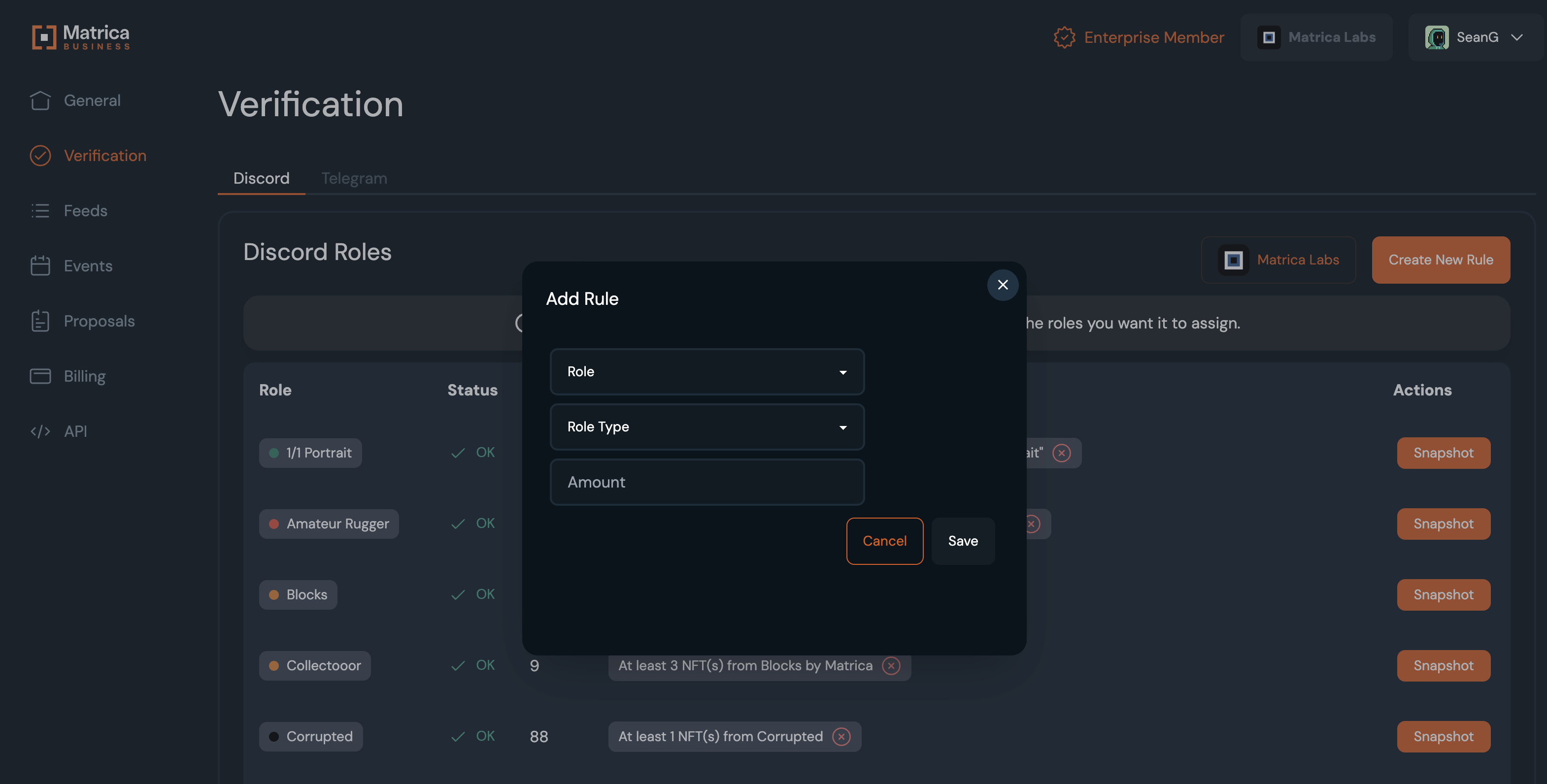
After inviting our bot, go back to the Matrica Business website and refresh the page. You should now see the **"Create New Rule"** button.

Click **"Create New Rule"** and follow the steps to add your roles and requirements.

<figure><img src="https://2946875910-files.gitbook.io/~/files/v0/b/gitbook-x-prod.appspot.com/o/spaces%2FLywT3slSQ4GoAk6k17dV%2Fuploads%2FjmciB9nGwkevsYNJYXac%2FScreenshot%202024-03-07%20at%2011.50.45%E2%80%AFAM.png?alt=media&amp;token=a70cfb2b-2fdc-486d-be4c-f6fd992baa56" alt=""><figcaption></figcaption></figure>

{% hint style="danger" %}
After adding the rule for a role, the initial sync and distribution of the role will take \~1 hour to verify 1,000 users (\~75 roles / 5 minutes), so make sure you set up the roles first before letting your community know verification is live, to avoid friction.&#x20;
{% endhint %}


# Fungible Token Roles

Set roles based on specific SPL, ERC-20, BRC-20 or Runes Tokens held.

{% hint style="warning" %}
If you would like to add a Coin/Token to your community, please reach out to the Matrica Team in your Support Channel.
{% endhint %}

To set up a Token role, select the **"Create New Rule"** button. \
\
Select Token under "Role Type".&#x20;

<figure><img src="https://2946875910-files.gitbook.io/~/files/v0/b/gitbook-x-prod.appspot.com/o/spaces%2FLywT3slSQ4GoAk6k17dV%2Fuploads%2FWR1MoB95jUnUgyWLai1K%2FScreenshot%202024-05-09%20at%203.59.20%E2%80%AFPM.png?alt=media&amp;token=0e80be19-7276-440c-8b96-81c61dfb329b" alt=""><figcaption></figcaption></figure>

From here, you can search the Token you want to associate with the role. If your Token is not in the list, please message the Matrica Team to get it added.&#x20;


# Amount Based Roles

Set roles for holding multiple NFTs from the same or different collections!

To set up an amount based role, simply select the **"Create New Rule"** button and scroll to the amount section at the bottom of the menu.

From here you can enter the amount of NFTs that applies to the role.

<figure><img src="https://2946875910-files.gitbook.io/~/files/v0/b/gitbook-x-prod.appspot.com/o/spaces%2FLywT3slSQ4GoAk6k17dV%2Fuploads%2FqbG9rvKUCeV6JR0GbLYR%2FAmount%20Based.png?alt=media&amp;token=cf6290e8-2a21-4654-a189-87abc930faef" alt=""><figcaption></figcaption></figure>


# Attribute Based Roles

Set roles based on specific attributes of NFTs in your collection!

To set up an Attribute based role, first select the **"Create New Rule"** button. \
\
Next:&#x20;

* Search for the collection&#x20;
* Scroll to the "Requirement" section
* Select the "Specific Attribute" option

<figure><img src="https://2946875910-files.gitbook.io/~/files/v0/b/gitbook-x-prod.appspot.com/o/spaces%2FLywT3slSQ4GoAk6k17dV%2Fuploads%2FRWiH4ai8L6SsyvQqCL6q%2FAttribute%20Based%201.png?alt=media&amp;token=89c0cb48-26b5-42e0-b1d6-f7dddfc06a09" alt=""><figcaption></figcaption></figure>

Now you can search in the "Attributes" box for the specific attribute(s), you want to have added to the role logic.

<figure><img src="https://2946875910-files.gitbook.io/~/files/v0/b/gitbook-x-prod.appspot.com/o/spaces%2FLywT3slSQ4GoAk6k17dV%2Fuploads%2Fh7VanK7m1iBbihEGJ3Lq%2FAttribute%20Based%202.png?alt=media&amp;token=13ee1c8f-9c74-4ca5-a2f5-c572536fbd85" alt=""><figcaption></figcaption></figure>


# AND/OR BASED ROLES

Advanced Logic Operators and Multiple Rules

Setting up multiple rules for a single role allows for in depth Token logic to be applied to your Discord roles. After setting up your first rule, adding another will prompt the use of a “Logic Operator”

**“AND”**

* Setting up roles using the “AND” logic operator allows you to stack rules, so that all criteria must be met in order to be assigned the role

Example:&#x20;

At least 1 NFT from “x collection”

“AND” At least 1,000 "y Tokens"<br>

**“OR”**

* Setting up roles using the “OR” logic operator allows you to set multiple rules for a single role, so that any criteria can be met in order to be assigned the role

Example:&#x20;

At least 1 NFT from “x collection” with attribute “x”

“OR” At least 1 NFT from “y collection” with attribute “y”

<figure><img src="https://2946875910-files.gitbook.io/~/files/v0/b/gitbook-x-prod.appspot.com/o/spaces%2FLywT3slSQ4GoAk6k17dV%2Fuploads%2FLiMxNl0iesNisBpOroaR%2FLogic%20Op.png?alt=media&amp;token=0b7fbec7-feb9-4f10-9ba6-4412536e28dd" alt=""><figcaption></figcaption></figure>


# Status Based Roles

Set roles based on a specific status of NFTs in your collection.

Matrica offers multiple "status" based roles that allows community managers to give roles to users who have their NFT either "Listed", "Rented" or "Staked"

Go to the "Discord Verification" tab and select the "add rule" option. Then scroll down to the "Requirement" section and select "Status."\
\
From here you can select either a "Listed", "Rented", "Staked" NFT Status.

{% hint style="info" %}
The "Listed" Status only applies to Bitcoin Ordinals, as the Ordinal remains in users wallets when listing. \
\
On the other side "Rented" and "Staked" refers to Eth or Sol Nfts only.
{% endhint %}

<figure><img src="https://2946875910-files.gitbook.io/~/files/v0/b/gitbook-x-prod.appspot.com/o/spaces%2FLywT3slSQ4GoAk6k17dV%2Fuploads%2F7aul8oKYChxmyYtnpSuh%2FScreenshot%202024-12-05%20at%202.03.53%E2%80%AFPM.png?alt=media&amp;token=7de46679-7686-47ee-9d06-35eb330840b5" alt=""><figcaption></figcaption></figure>


# Verified Collection Roles

Set roles based on verified collections with Matrica from other communities. Great for giving out Whitelist and Airdrop allocations to top collections across chains.

To create a role from another Matrica Verified Collection, go to “Collection Type” and choose “Verified Collections”. From here you can search from any collection verified by Matrica and create roles for your server.<br>

<figure><img src="https://2946875910-files.gitbook.io/~/files/v0/b/gitbook-x-prod.appspot.com/o/spaces%2FLywT3slSQ4GoAk6k17dV%2Fuploads%2FKZg1VoPnt13F29rKcC06%2Fimage.png?alt=media&amp;token=c7f7f295-2284-4eaa-9805-f31a84c770bb" alt=""><figcaption></figcaption></figure>


# X Username Gating

Gating based on X Usernames is now live!&#x20;

<figure><img src="https://2946875910-files.gitbook.io/~/files/v0/b/gitbook-x-prod.appspot.com/o/spaces%2FLywT3slSQ4GoAk6k17dV%2Fuploads%2FwXq3KbOQpBSpbiFrvpcK%2FX%20Gating.png?alt=media&amp;token=b9c15143-6f14-4209-a547-c68351850006" alt=""><figcaption></figcaption></figure>

This feature is included in the Pro Plan. To have it enabled reach out to the Matrica staff in your channel.<br>

First, click "Create New Rule" under the Verification tab and select your role and 'Social'.&#x20;

<figure><img src="https://2946875910-files.gitbook.io/~/files/v0/b/gitbook-x-prod.appspot.com/o/spaces%2FLywT3slSQ4GoAk6k17dV%2Fuploads%2FNW2nncQySSdhUBHq4FuO%2FScreenshot%202024-07-23%20at%201.07.32%E2%80%AFPM.png?alt=media&amp;token=0f47aa4d-539c-489f-b9fc-963d8ffaaade" alt=""><figcaption></figcaption></figure>

Once created click on the 'Manage' button next to the role.&#x20;

<figure><img src="https://2946875910-files.gitbook.io/~/files/v0/b/gitbook-x-prod.appspot.com/o/spaces%2FLywT3slSQ4GoAk6k17dV%2Fuploads%2Fnx1bZISakgsqpAHlYaKL%2FScreenshot%202024-07-23%20at%201.07.12%E2%80%AFPM.png?alt=media&amp;token=d2e5569b-d412-4422-a2c6-67a12604b85b" alt=""><figcaption></figcaption></figure>

Next, click on 'Whitelist Member'.&#x20;

<figure><img src="https://2946875910-files.gitbook.io/~/files/v0/b/gitbook-x-prod.appspot.com/o/spaces%2FLywT3slSQ4GoAk6k17dV%2Fuploads%2FtruWihCe45gdEBUXfQcv%2FScreenshot%202024-07-23%20at%201.10.38%E2%80%AFPM.png?alt=media&amp;token=f40a2f20-20f1-4c47-9023-df495aa72c20" alt=""><figcaption></figcaption></figure>

Finally, you can add in a list of X Usernames separated by commas and click Save.

<figure><img src="https://2946875910-files.gitbook.io/~/files/v0/b/gitbook-x-prod.appspot.com/o/spaces%2FLywT3slSQ4GoAk6k17dV%2Fuploads%2F60NAwZvSEULRkrCi0hvF%2FScreenshot%202024-07-23%20at%201.12.21%E2%80%AFPM.png?alt=media&amp;token=4237c36d-c431-4a33-b8b3-161bb9690cb3" alt=""><figcaption></figcaption></figure>


# Wallet Address Gating

Gating based on Wallet Addresses is now live!&#x20;

<figure><img src="https://2946875910-files.gitbook.io/~/files/v0/b/gitbook-x-prod.appspot.com/o/spaces%2FLywT3slSQ4GoAk6k17dV%2Fuploads%2Fcch3wJwa3BIQrIDhylKx%2Fmatrica_walletadd.jpg?alt=media&amp;token=6b690a92-6971-41ee-918a-fea8f5d34112" alt=""><figcaption></figcaption></figure>

This feature is included in the Pro Plan. To have it enabled reach out to the Matrica staff in your channel.<br>

First, click "Create New Rule" under the Verification tab and select your role and 'External'.&#x20;

<figure><img src="https://2946875910-files.gitbook.io/~/files/v0/b/gitbook-x-prod.appspot.com/o/spaces%2FLywT3slSQ4GoAk6k17dV%2Fuploads%2Fts6KZXU6zNNMejxFVgCG%2FScreenshot%202024-07-23%20at%201.05.31%E2%80%AFPM.png?alt=media&amp;token=8f914dec-551d-4ecd-808b-81fc2f4abe24" alt=""><figcaption></figcaption></figure>

Once created click on the 'Manage' button next to the role.&#x20;

<figure><img src="https://2946875910-files.gitbook.io/~/files/v0/b/gitbook-x-prod.appspot.com/o/spaces%2FLywT3slSQ4GoAk6k17dV%2Fuploads%2Fr0zfqoSUKg0x8kFCRv7d%2FScreenshot%202024-07-23%20at%201.06.59%E2%80%AFPM.png?alt=media&amp;token=346621c9-4cf1-4731-ab7c-ad050a6a9587" alt=""><figcaption></figcaption></figure>

Next, click on 'Whitelist Member'.&#x20;

<figure><img src="https://2946875910-files.gitbook.io/~/files/v0/b/gitbook-x-prod.appspot.com/o/spaces%2FLywT3slSQ4GoAk6k17dV%2Fuploads%2FxEzbex7zHql8oBpuCDso%2FScreenshot%202024-07-23%20at%201.14.53%E2%80%AFPM.png?alt=media&amp;token=a4c11d08-ecd3-4e44-94d4-7e7447d098fe" alt=""><figcaption></figcaption></figure>

Finally, you can add in a list of wallet addresses separated by commas and click Save.

<figure><img src="https://2946875910-files.gitbook.io/~/files/v0/b/gitbook-x-prod.appspot.com/o/spaces%2FLywT3slSQ4GoAk6k17dV%2Fuploads%2Ftgnzy3Cw8lsBx7ZDZJkE%2FScreenshot%202024-07-23%20at%201.13.46%E2%80%AFPM.png?alt=media&amp;token=0ae6ec09-120f-4168-9d74-21a818eb1398" alt=""><figcaption></figcaption></figure>


# Validator Stake Gating

Matrica now supports staked Solana and Liquid Staking Tokens. Verify Stakers from any Validator and the amount staked. Contact the Matrica Team to add your Validator and Token.

<figure><img src="https://2946875910-files.gitbook.io/~/files/v0/b/gitbook-x-prod.appspot.com/o/spaces%2FLywT3slSQ4GoAk6k17dV%2Fuploads%2FgJ6Y0wrUdp1nvkEoem0H%2Fmatrica%20validators%20(1).png?alt=media&amp;token=6dd7ce77-59f9-4014-86d6-bf41075acb7b" alt=""><figcaption></figcaption></figure>

Once your Validator has been added, you can create your rule by setting the criteria with the Token selection and then searching your Validator name.

<figure><img src="https://2946875910-files.gitbook.io/~/files/v0/b/gitbook-x-prod.appspot.com/o/spaces%2FLywT3slSQ4GoAk6k17dV%2Fuploads%2F4c7T9IQkpcroe1yRVx5W%2Fimage.png?alt=media&amp;token=c7e47f0b-29a1-4584-baf1-8fa1664345d6" alt=""><figcaption></figcaption></figure>


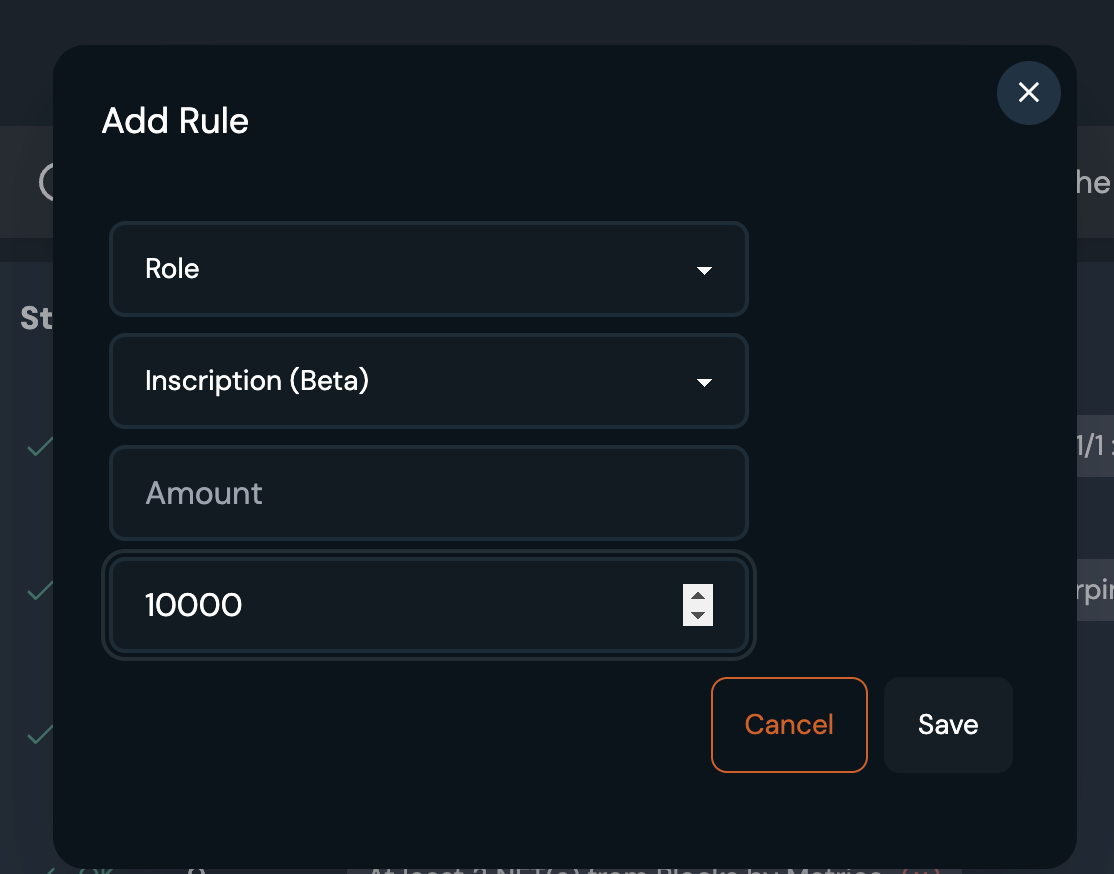
# Inscription # Based Roles

For Bitcoin Ordinals, you can verify holders of Inscription numbers under a certain Inscription threshold. Click **"Create New Rule"** and select **Inscription.**

{% hint style="info" %}
The **inscription number** refers to the **chronological order** in which an inscription was created (i.e. written or “inscribed” onto a sat). Means this feature is applicable mainly for low inscription numbers, as they are sometimes not tied to a specific collection (e.g. sub 1K).
{% endhint %}

<figure><img src="https://2946875910-files.gitbook.io/~/files/v0/b/gitbook-x-prod.appspot.com/o/spaces%2FLywT3slSQ4GoAk6k17dV%2Fuploads%2FAnzhgHpEwfWkyZD7uWlu%2FScreenshot%202024-03-07%20at%2012.10.25%E2%80%AFPM.png?alt=media&amp;token=3f65deda-9b07-4732-9298-6dfcf378a964" alt=""><figcaption></figcaption></figure>

Here you can set a "**Maximum Inscription Number"** for which all Inscription Numbers \<X will meet the criteria and be verified.

Examples: <1,000 , <10,000, <100,000.

<figure><img src="https://2946875910-files.gitbook.io/~/files/v0/b/gitbook-x-prod.appspot.com/o/spaces%2FLywT3slSQ4GoAk6k17dV%2Fuploads%2FavJ9a29XLmXOeMKfEYi5%2FScreenshot%202024-03-07%20at%2012.13.33%E2%80%AFPM.png?alt=media&amp;token=bfabf049-d062-427c-994a-2397878d7f44" alt=""><figcaption></figcaption></figure>


# Royalty Based Roles

Assign roles to users or gate Discord channels to users who have or have not paid royalties.

{% hint style="warning" %}
We advise Royalty Roles to be assigned **in addition** to holder roles to reduce friction for users entering a new community.
{% endhint %}

To set up a Royalty based role, select the "Add Rule" button. Next, select the "Royalty" option on the Rule menu.

<figure><img src="https://2946875910-files.gitbook.io/~/files/v0/b/gitbook-x-prod.appspot.com/o/spaces%2FLywT3slSQ4GoAk6k17dV%2Fuploads%2FZe0eUSxaa1fGK6hDlZ9n%2FRoyalty.png?alt=media&amp;token=594f8bf1-7676-45e6-9139-2df76ba75e08" alt=""><figcaption></figcaption></figure>

Next, select your desired gating option for Royalties. You can choose to assign a role to users who have paid royalties, and also distribute roles to users who have not paid royalties.<br>


# Telegram Set-Up

Get your Telegram holder verification started!

<figure><img src="https://2946875910-files.gitbook.io/~/files/v0/b/gitbook-x-prod.appspot.com/o/spaces%2FLywT3slSQ4GoAk6k17dV%2Fuploads%2F6zcOgNmjYTsgq6Tfiswn%2Fmatrica_telegram.png?alt=media&amp;token=c389f709-ac88-4d79-b538-9d22c3c9031d" alt=""><figcaption></figcaption></figure>

{% content-ref url="/pages/Z5A5oENC9sD4BhljhcsM" %}
[Invite the Bot](/guides/community-guide/telegram-set-up/invite-the-bot)
{% endcontent-ref %}

{% content-ref url="/pages/83hXMEBOeBao0hIWE4I7" %}
[Bot Commands](/guides/community-guide/telegram-set-up/bot-commands)
{% endcontent-ref %}

{% content-ref url="/pages/ExpU1YzowSX7LaLa5Py4" %}
[Add Requirements](/guides/community-guide/telegram-set-up/add-requirements)
{% endcontent-ref %}

{% content-ref url="/pages/NhMpjtEaj0cg9v7X7Zcg" %}
[Invite Links](/guides/community-guide/telegram-set-up/invite-links)
{% endcontent-ref %}


# Invite the Bot

Under the **"Verification"** you will also find an option for Telegram. Once you click on the Telegram option you will be prompted to **"Invite Bot"**. From there, you can select your community group chat on Telegram that you would like to token gate with Matrica.&#x20;

{% hint style="danger" %}
Only users joining the group after its complete setup will undergo verification. Those who were part of the Telegram group before the bot setup won't be removed.
{% endhint %}

<figure><img src="https://2946875910-files.gitbook.io/~/files/v0/b/gitbook-x-prod.appspot.com/o/spaces%2FLywT3slSQ4GoAk6k17dV%2Fuploads%2F7NUTVvak4orUvKK2gF0B%2Fimage.png?alt=media&amp;token=5163042c-a1d6-4977-a800-6f01685f0c95" alt=""><figcaption></figcaption></figure>


# Bot Commands

The primary bot commands to get started:

* **/start** = Run this to connect your Telegram group to your Matrica Community
* **/info** = Detailed explanation of the steps to set-up your group
* **/help** = View all of the commands available with the Matrica bot and their functions<br>

See these commands in action below:<br>

Once the bot is invited into your group, run the **/start in the group** to get started setting up holder verification.

<figure><img src="https://2946875910-files.gitbook.io/~/files/v0/b/gitbook-x-prod.appspot.com/o/spaces%2FLywT3slSQ4GoAk6k17dV%2Fuploads%2FX7dnQSgpbFYFgM8gjrKi%2FScreenshot%202024-11-20%20at%2012.22.04%E2%80%AFPM.png?alt=media&amp;token=1b7dff8d-76b3-40f2-95cc-ab02d34626ee" alt=""><figcaption></figcaption></figure>

Run **/info** for a detailed guide to setting up the Matrica Telegram bot:

<figure><img src="https://2946875910-files.gitbook.io/~/files/v0/b/gitbook-x-prod.appspot.com/o/spaces%2FLywT3slSQ4GoAk6k17dV%2Fuploads%2FUgrQPYvHlcdWFfqbuNXS%2FScreenshot%202024-11-20%20at%2012.25.24%E2%80%AFPM.png?alt=media&amp;token=305497c3-8a62-42bc-bf97-a357034623e0" alt=""><figcaption></figcaption></figure>

Run **/help** for a list Matrica Telegram bot commands and their functions:

<figure><img src="https://2946875910-files.gitbook.io/~/files/v0/b/gitbook-x-prod.appspot.com/o/spaces%2FLywT3slSQ4GoAk6k17dV%2Fuploads%2FxOGk5DKgsVxFRUEXxCcU%2FScreenshot%202024-11-20%20at%2012.22.57%E2%80%AFPM.png?alt=media&amp;token=184e1f1d-d7b5-4df4-9500-dab43ccfb02d" alt=""><figcaption></figcaption></figure>


# Add Requirements

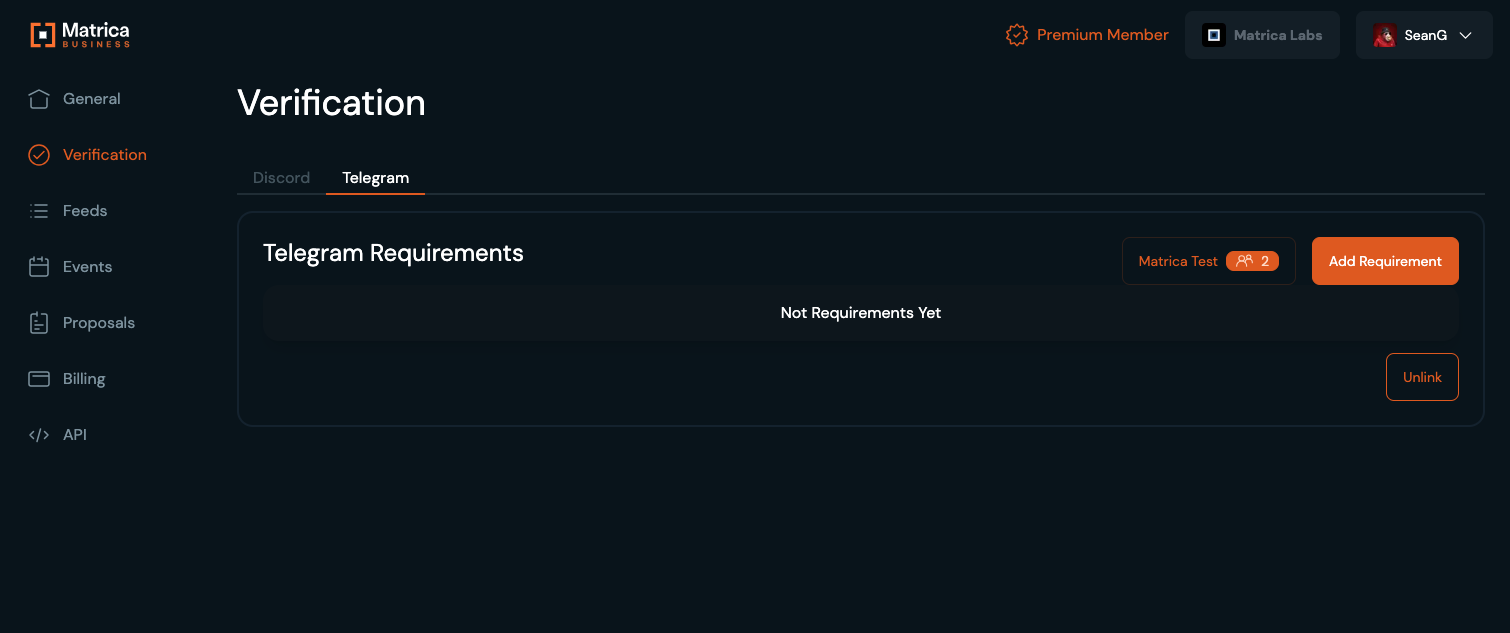
After the **/start** command has been run in your group, you can return back to Matrica Business to set up the requirements for your Telegram group.&#x20;

<figure><img src="https://2946875910-files.gitbook.io/~/files/v0/b/gitbook-x-prod.appspot.com/o/spaces%2FLywT3slSQ4GoAk6k17dV%2Fuploads%2FHSJV8sU52RP5mQg8cuAk%2Fimage.png?alt=media&amp;token=351f0423-6a34-4c39-b769-006d08b95a35" alt=""><figcaption></figcaption></figure>

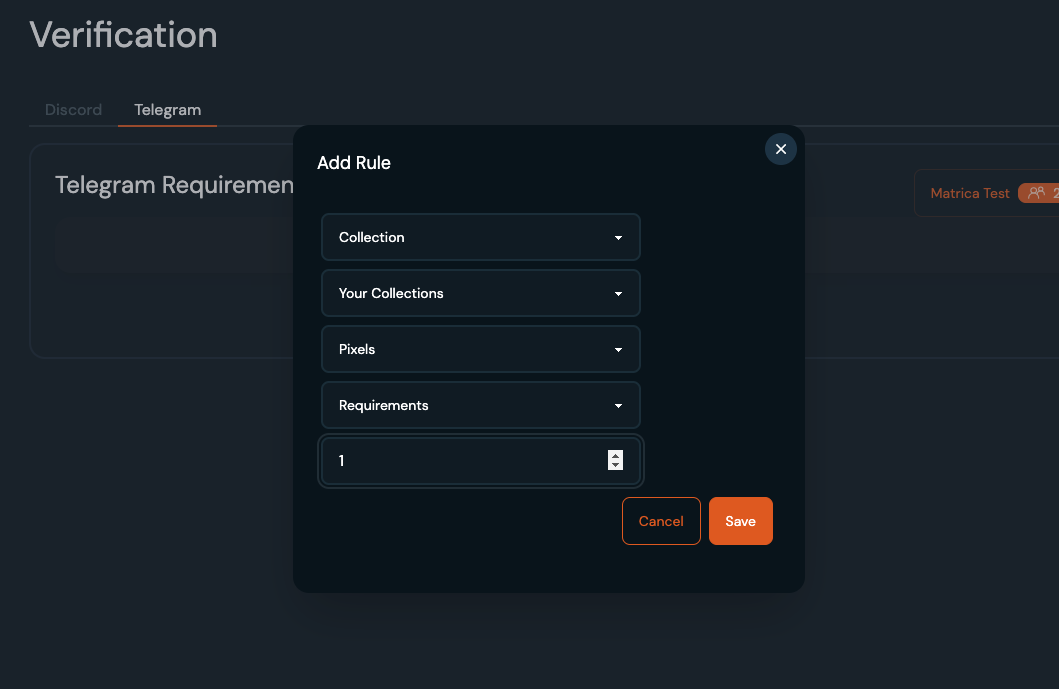
Click **Add Requirement** to set up the criteria for your group:&#x20;

<figure><img src="https://2946875910-files.gitbook.io/~/files/v0/b/gitbook-x-prod.appspot.com/o/spaces%2FLywT3slSQ4GoAk6k17dV%2Fuploads%2FTOxSEYRtjbGgrUOEi15d%2Fimage.png?alt=media&amp;token=7d315097-ecae-4b0a-9157-60ceb0a69b6c" alt=""><figcaption></figcaption></figure>

{% content-ref url="/pages/cANylslxYUGd6aUrYtdr" %}
[Setting up Roles](/guides/community-guide/verification/setting-up-roles)
{% endcontent-ref %}


# Invite Links

We recommend using a "request" invite link, users that will use that link need to be approved or rejected by the bot.

How to create such a link?

1. Click on **Manage Group**

<figure><img src="https://2946875910-files.gitbook.io/~/files/v0/b/gitbook-x-prod.appspot.com/o/spaces%2FLywT3slSQ4GoAk6k17dV%2Fuploads%2FIE1M5wvey0Z5jevNQH8I%2Fimage.png?alt=media&amp;token=fb822e92-6511-4b32-b98f-6e48b8404e51" alt=""><figcaption></figcaption></figure>

2. Click on **Invite links**

<figure><img src="https://2946875910-files.gitbook.io/~/files/v0/b/gitbook-x-prod.appspot.com/o/spaces%2FLywT3slSQ4GoAk6k17dV%2Fuploads%2FGNfN8pksgpdnGc7tTusy%2Fimage.png?alt=media&amp;token=7dd69f04-e40e-456d-b2c8-157b5dcee274" alt=""><figcaption></figcaption></figure>

3. Click on **Create a New Link**

<figure><img src="https://2946875910-files.gitbook.io/~/files/v0/b/gitbook-x-prod.appspot.com/o/spaces%2FLywT3slSQ4GoAk6k17dV%2Fuploads%2FmDTVBK88gUD4c6tZy5B0%2Fimage.png?alt=media&amp;token=25a3226a-7901-4257-8408-d5e7329b6a72" alt=""><figcaption></figcaption></figure>

4. Enable **Request admin approval**

<figure><img src="https://2946875910-files.gitbook.io/~/files/v0/b/gitbook-x-prod.appspot.com/o/spaces%2FLywT3slSQ4GoAk6k17dV%2Fuploads%2FPwRpKcWoSH8tSQ47MaeL%2Fimage.png?alt=media&amp;token=2762db4e-9da6-4763-b549-8115ec75fdb0" alt=""><figcaption></figcaption></figure>


# Sales Bot and Web-hooks

Web-hooks allows for automated notifications sent directly to your Discord, Twitter or Telegram. These can be NFT sales feed (a.k.a Sales Bots), listing feed, voting feed, etc. Whatever information you want to share with your users.

<figure><img src="https://2946875910-files.gitbook.io/~/files/v0/b/gitbook-x-prod.appspot.com/o/spaces%2FLywT3slSQ4GoAk6k17dV%2Fuploads%2FCBKp6GVfd9uikjkZ6R2y%2FcNFT%20Sales.jpg?alt=media&amp;token=a8a8de0f-f343-4ef5-9f23-d2b0b26fc337" alt=""><figcaption></figcaption></figure>

{% content-ref url="/pages/sFPamnvOJQtAQIrcGAY1" %}
[Discord Sales and Listings](/guides/community-guide/sales-bot-and-web-hooks/discord-sales-and-listings)
{% endcontent-ref %}

{% content-ref url="/pages/O58nTASu4SmhmNKkULTi" %}
[Telegram Sales](/guides/community-guide/sales-bot-and-web-hooks/telegram-sales)
{% endcontent-ref %}


# Discord Sales and Listings

*Setup*

1\) Create a channel for your NFT sales feed on Discord. Right click the channel and choose “Edit channel”. From there click “Integrations” and create a new web-hook.

<figure><img src="https://2946875910-files.gitbook.io/~/files/v0/b/gitbook-x-prod.appspot.com/o/spaces%2FLywT3slSQ4GoAk6k17dV%2Fuploads%2FwKEHQJhf1MlSM8Lk5vkp%2Fimage.png?alt=media&amp;token=eccc5f7f-ce67-439e-bdcd-312a7399b550" alt=""><figcaption></figcaption></figure>

2\) Copy this webhook. Go to the “Web-hooks” tab on Matrica admin and paste the web-hook. Choose the action you want to be notified of, i.e SALE, and choose the collection. Click “Save”.

<figure><img src="https://2946875910-files.gitbook.io/~/files/v0/b/gitbook-x-prod.appspot.com/o/spaces%2FLywT3slSQ4GoAk6k17dV%2Fuploads%2FrI1OTpAroSUP58mfeJqZ%2Fimage.png?alt=media&amp;token=22367431-39eb-45b2-9b55-981661f41cd1" alt=""><figcaption></figcaption></figure>

{% hint style="info" %}
Compressed NFT sales bot is now live! Please note, currently only Tensor sales and listings will be reported.&#x20;
{% endhint %}


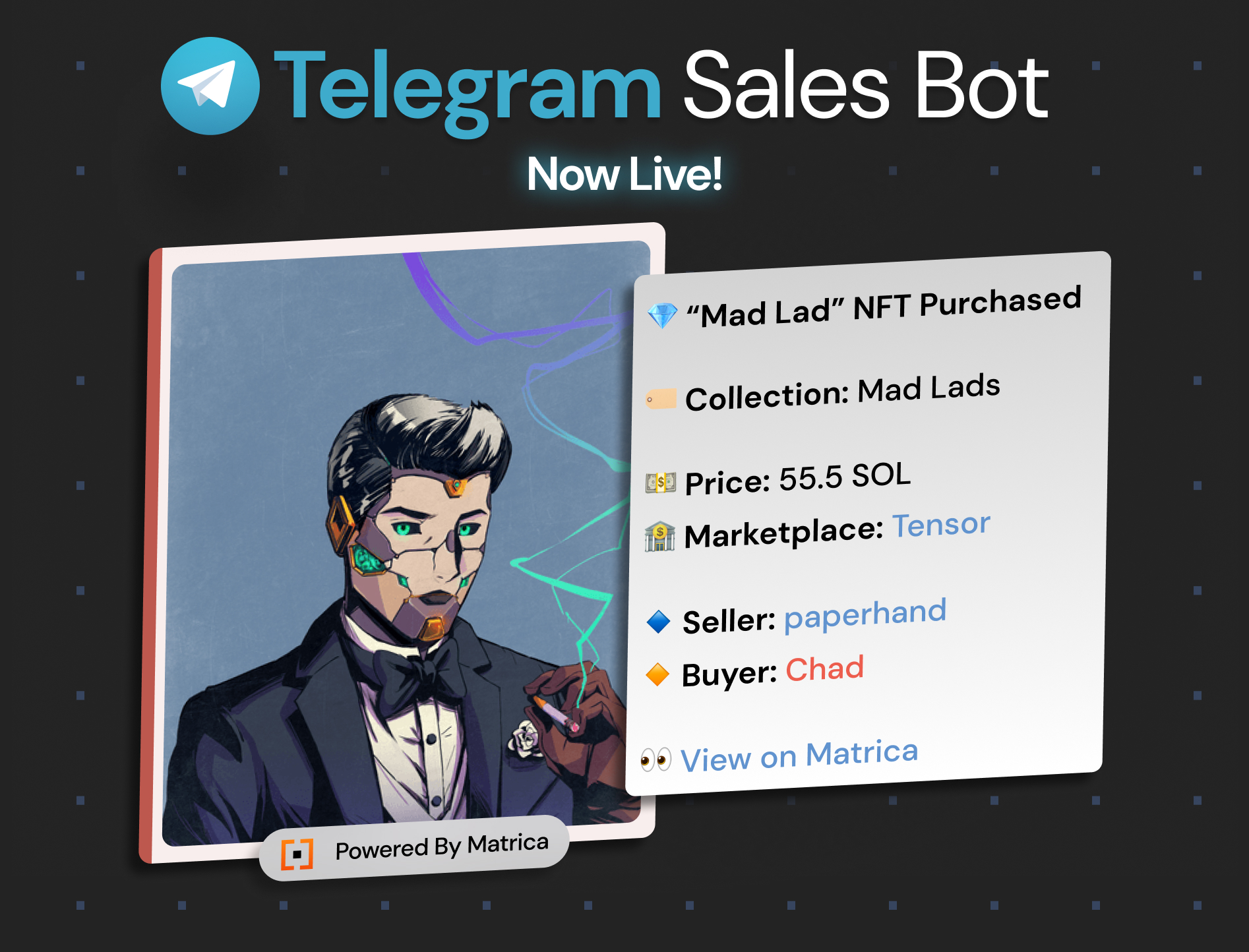
# Telegram Sales

<figure><img src="https://2946875910-files.gitbook.io/~/files/v0/b/gitbook-x-prod.appspot.com/o/spaces%2FLywT3slSQ4GoAk6k17dV%2Fuploads%2Fr3kxuiX3uj3vC1nJQrvf%2FTelegramSalesbot.jpg?alt=media&amp;token=b3b30b0d-0d08-4280-8f6f-bd9480479802" alt=""><figcaption></figcaption></figure>

**Setup**

First, follow the instructions for inviting the Matrica bot to your Telegram group by following the set-up instruction here. Ensure your Telegram group is connected to your community on Matrica.

{% content-ref url="/pages/cMCftFFly6DBS37ScxjF" %}
[Telegram Set-Up](/guides/community-guide/telegram-set-up)
{% endcontent-ref %}

Next, go to the “Feeds” tab on Matrica Business and click the Telegram Sales tab.

Choose the group from the list that you would like the NFT Sales notifications to post to and click "Add Collection" to choose the collection you would like to add the Sales for.

<figure><img src="https://2946875910-files.gitbook.io/~/files/v0/b/gitbook-x-prod.appspot.com/o/spaces%2FLywT3slSQ4GoAk6k17dV%2Fuploads%2F69TykcUBYjIfWpPNo5Mk%2FScreenshot%202024-09-12%20at%203.37.27%E2%80%AFPM.png?alt=media&amp;token=b5853527-c71e-43ab-96b7-455650ec1732" alt=""><figcaption></figcaption></figure>

**Topics**

If you would like add NFT Sales notification to a Telegram Topic:\
\
1\. Create a Topic called "**Matrica Sales**". \
2\. "Add Collection" on the Business Dashboard once the Topic has populated here.\
3\. You can rename the Topic once the configuration is set-up on the Business Dashboard.\
\
\* If you are setting up multiple topics, follow the steps above one at a time, naming each Topic "**Matrica Sales**" first and then setting up the collection before creating a new Topic.&#x20;


# Events

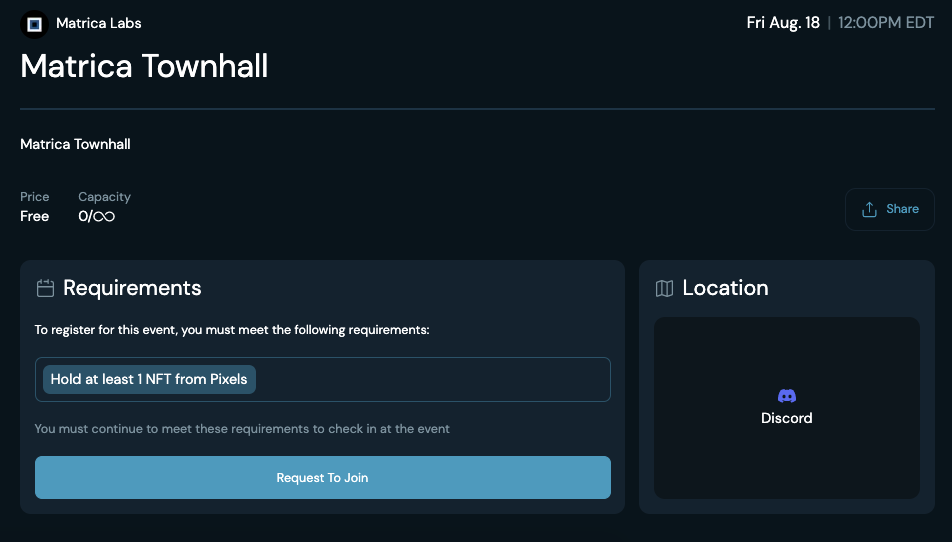
The "Events" tab allows you to add all of your community events in one place and share them with your community as well as all Matrica users.&#x20;

<figure><img src="https://2946875910-files.gitbook.io/~/files/v0/b/gitbook-x-prod.appspot.com/o/spaces%2FLywT3slSQ4GoAk6k17dV%2Fuploads%2FaKpSNwdk5e5S5lzLDvAu%2Fevents.jpg?alt=media&amp;token=be0ec108-7fdb-44ce-93f5-468d773f5668" alt=""><figcaption></figcaption></figure>

{% content-ref url="/pages/M9FMU4LDSrxbnT5XChGr" %}
[Create Event](/guides/community-guide/events/create-event)
{% endcontent-ref %}

{% content-ref url="/pages/hEn9yr3HTwOcoZF4Nap8" %}
[Location](/guides/community-guide/events/location)
{% endcontent-ref %}

{% content-ref url="/pages/8OVMp4e6y2zRbslGvkVF" %}
[Requirements](/guides/community-guide/events/requirements)
{% endcontent-ref %}

{% content-ref url="/pages/mXPjUmF413dOt4D506rx" %}
[Ticketing](/guides/community-guide/events/ticketing)
{% endcontent-ref %}


# Create Event

To create an Event, go to the "Events" tab and click "Create Event". You will then be able to fill out all the information for your event and set requirements for users to join. You can make the events open to all users or set specific Token requirements to register.

<figure><img src="https://2946875910-files.gitbook.io/~/files/v0/b/gitbook-x-prod.appspot.com/o/spaces%2FLywT3slSQ4GoAk6k17dV%2Fuploads%2Ft2nB1hdvoCYEJjhKGgpo%2Fimage.png?alt=media&amp;token=7948c808-ee78-479e-ad52-abe3d5c1eda3" alt=""><figcaption></figcaption></figure>

Allowing access to be "Publicly Visible" and then selecting "Publish Event", will populate your event on the "Events Calendar" page on the Matrica site. All Matrica users will be able to see your community event in this list.&#x20;

<figure><img src="https://2946875910-files.gitbook.io/~/files/v0/b/gitbook-x-prod.appspot.com/o/spaces%2FLywT3slSQ4GoAk6k17dV%2Fuploads%2FUJrpfo3qhGdGkDU98W3a%2FEventFeed.png?alt=media&amp;token=c7331d8f-399c-482f-b1ed-a1014c20c33c" alt=""><figcaption></figcaption></figure>


# Location

Add the "**Location**" of your event, whether it's an in-person gathering or a virtual occasion such as Twitter space or Discord event.

For those hosting physical events, you can specify the exact address or venue where your event will take place. You also have the option to hide the location from the public view.

For virtual events, you have the flexibility to input the necessary details for attendees to join from anywhere in the world.

<figure><img src="https://2946875910-files.gitbook.io/~/files/v0/b/gitbook-x-prod.appspot.com/o/spaces%2FLywT3slSQ4GoAk6k17dV%2Fuploads%2F3r3f5x3RcsKlJUK75Omc%2FEventslocation.png?alt=media&amp;token=b9226448-efec-435b-a2ab-f08dcb722163" alt=""><figcaption></figcaption></figure>


# Requirements

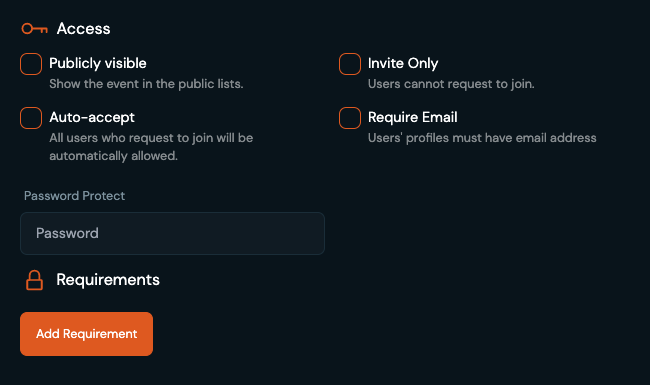
Manage who has access to your Event by setting the "**Access**" settings. This allows for both public and private event creation.&#x20;

<figure><img src="https://2946875910-files.gitbook.io/~/files/v0/b/gitbook-x-prod.appspot.com/o/spaces%2FLywT3slSQ4GoAk6k17dV%2Fuploads%2F16OBqqzVcmo212AJYYdQ%2Faccessxrequirements.png?alt=media&amp;token=a88b8ff0-8fff-46b7-b7cc-82af23f69680" alt=""><figcaption></figcaption></figure>

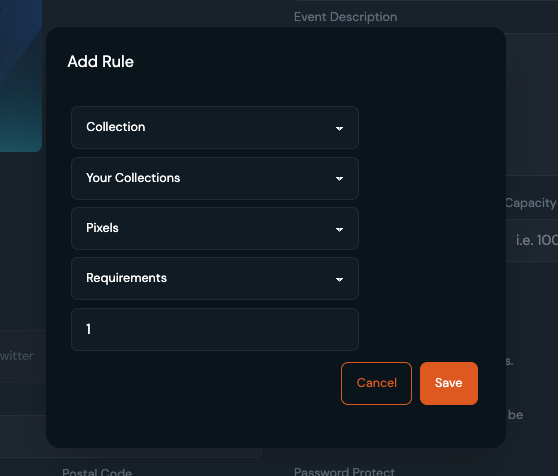
Requirements based on Token holdings can also be set. Gate your RSVP's to holders of specific Tokens.

<figure><img src="https://2946875910-files.gitbook.io/~/files/v0/b/gitbook-x-prod.appspot.com/o/spaces%2FLywT3slSQ4GoAk6k17dV%2Fuploads%2FbCcgoEUWm1TzH4qEYzJd%2Feventreq.png?alt=media&amp;token=298605d2-2182-472a-86ff-d8221018ed1e" alt=""><figcaption></figcaption></figure>


# Ticketing

Once the Event is created, you can select the Event under the "**Events**" tab in order to manage attending and requesting users. Here, you will be able to fully manage your guest lists by accepting and rejecting user's RSVP's.

For IRL events, users can be scanned in once accepted. The "Hosts" of the event will have the ability to scan the QR code of the users who have been accepted.

<figure><img src="https://2946875910-files.gitbook.io/~/files/v0/b/gitbook-x-prod.appspot.com/o/spaces%2FLywT3slSQ4GoAk6k17dV%2Fuploads%2F4cRXpweQgjMHK8q8m2rn%2Feventsexample.png?alt=media&amp;token=4fcc9a7a-fcb0-4c23-b08b-b0e58e423b61" alt=""><figcaption></figcaption></figure>

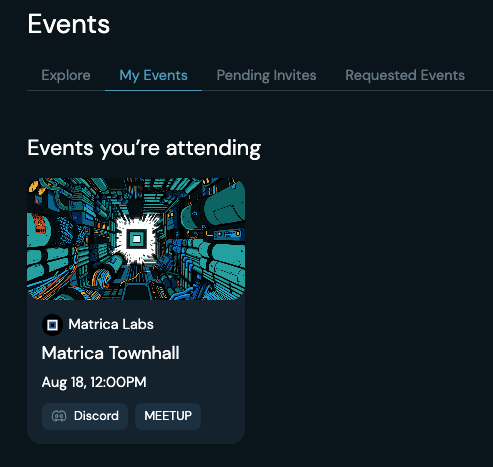
Each accepted user can find their QR code for entry scanning under their "My Events"&#x20;

<figure><img src="https://2946875910-files.gitbook.io/~/files/v0/b/gitbook-x-prod.appspot.com/o/spaces%2FLywT3slSQ4GoAk6k17dV%2Fuploads%2FPfhLQ8AWmLRhkK0hInsM%2Feventrequest.png?alt=media&amp;token=907debbb-231c-4123-8afe-22f7972225f9" alt=""><figcaption></figcaption></figure>

<figure><img src="https://2946875910-files.gitbook.io/~/files/v0/b/gitbook-x-prod.appspot.com/o/spaces%2FLywT3slSQ4GoAk6k17dV%2Fuploads%2FbuThqF2Ji7moEPPFtVjP%2Fmyevents.png?alt=media&amp;token=3c71eb0d-4d90-4f00-8a91-bd3805112a6d" alt=""><figcaption></figcaption></figure>


# Proposals

DAO Voting

<figure><img src="https://2946875910-files.gitbook.io/~/files/v0/b/gitbook-x-prod.appspot.com/o/spaces%2FLywT3slSQ4GoAk6k17dV%2Fuploads%2FlePbBP3WwXeb4xLGdHc1%2FF56-PNNWsAAgCIb.png?alt=media&amp;token=d4a56604-e715-4ca5-abd1-53de8c43fa20" alt=""><figcaption></figcaption></figure>

1. To create a proposal, simply go the 'Proposals' tab and click “New Proposal”.
2. On this form, enter your title and description.&#x20;
3. Set the start date and end date for the proposal.
4. Add the Tokens you want to allow to vote. Max limit is 5.
5. Add the vote options.
6. Once the above steps have been completed, you can either save the proposal as a draft, or create it immediately.&#x20;

<figure><img src="https://2946875910-files.gitbook.io/~/files/v0/b/gitbook-x-prod.appspot.com/o/spaces%2FLywT3slSQ4GoAk6k17dV%2Fuploads%2FyXbpThHXlueDSaXEKon3%2FProposalsTab.png?alt=media&amp;token=77a91032-6f73-416a-92c5-e053f6b5490d" alt=""><figcaption></figcaption></figure>

<figure><img src="https://2946875910-files.gitbook.io/~/files/v0/b/gitbook-x-prod.appspot.com/o/spaces%2FLywT3slSQ4GoAk6k17dV%2Fuploads%2Fsfp2ujQqrACWM64Pq96E%2FCreateProposals.png?alt=media&amp;token=f5927251-cbdc-4405-97ce-4a66ae526380" alt=""><figcaption></figcaption></figure>


# Customer Support

## Customer Support

Run the **/setup** command in your server to create the channel called **#🔳-matrica-verify.**

The "Check Status" button will perform a diagnostic on the users profile, confirming the wallets linked and Tokens held. If further assistance is needed, another button will be present to click through to Matrica's Discord Ticket System to talk directly to our Customer Support.&#x20;

<figure><img src="https://2946875910-files.gitbook.io/~/files/v0/b/gitbook-x-prod.appspot.com/o/spaces%2FLywT3slSQ4GoAk6k17dV%2Fuploads%2FrcpA3F7bh8Sw3ncihLGB%2FScreenshot%202025-03-31%20at%201.52.06%E2%80%AFPM.png?alt=media&amp;token=2828af66-a1ff-435b-a67d-736d18e8fe98" alt=""><figcaption></figcaption></figure>


# Staking Support

## Staking Integration

Matrica can integrate your current staking platform so that holders do not lose their roles when they stake. To get started with staking, contact your Matrica representative and provide them with

1. A staking transaction, i.e:\
   <https://solscan.io/tx/3q5CsnAEDuuD1WTZ7hZvEvrj65xvVJpimny8bGLPqpRoHtbDnzbP4MrhBa7Vz5goCcWQupZvDQEoNcBKWD4HK7Y2>
2. An unstaking transaction, i.e:\
   <https://solscan.io/tx/628esCcayUzGWv9UWko39Ya2ykWeth4kDtWnuF4KEaFZawBP9BEjEsDQFGAGVrXjU9Pw3M7H4ijiwLrpHkwZ5vGK>

If both transactions interact with the same contract, we can add the information to our parser and it will detect staking and unstaking transactions for your collection.

If your staking does not have a contract, i.e it is a vault, you will need to provide us with an API where we can read a list of stakers and their NFTs. Ideally the format should be:

```
[
   wallet_id1: [nft_id1, nft_id2, nft_id3...],
   wallet_id2: [nft_id1, nft_id2, nft_id3...],
   wallet_id3: [nft_id1, nft_id2, nft_id3...],
   ...
]
```


# Add-Ons

The final tab under the General section is Addons. Here you can decide whether you would like to allow specific statuses of NFTs to be included towards your holder role. You can allow or deny **Listed** and **Rented** NFTs to be included in your holder roles.

<figure><img src="https://2946875910-files.gitbook.io/~/files/v0/b/gitbook-x-prod.appspot.com/o/spaces%2FLywT3slSQ4GoAk6k17dV%2Fuploads%2F8u8p82bFKVwadzkc1zfK%2FScreenshot%202024-11-20%20at%2012.19.48%E2%80%AFPM.png?alt=media&amp;token=97ddb0bb-289c-4cab-9ef9-be9f3d6ee5ee" alt=""><figcaption></figcaption></figure>

*\*Billed in addition to the subscription plan*

* **Role Limit Increase**: $15/month per 10 Token Gated Roles (20 Roles included in Premium)
* **Multi-Telegram Groups**: $15/month per group (1 Group included in Premium)
* **Snapshot Plus** - **Discord/Twitter IDs Included in Snapshot** : Additional $99 per month


# Enterprise

<figure><img src="https://2946875910-files.gitbook.io/~/files/v0/b/gitbook-x-prod.appspot.com/o/spaces%2FLywT3slSQ4GoAk6k17dV%2Fuploads%2F5HlZYV7ZlJ2uic2y4HYY%2Fmatricaenterprise.png?alt=media&amp;token=8dd169f7-6dd7-4756-9608-755cb0b81897" alt=""><figcaption></figcaption></figure>

Matrica Enterprise offers our most advanced features. Made for builders looking to create the best user and community experiences for their applications.&#x20;

* Matrica Connect - OAuth Solution for seamless user connection and profile creation on Apps.
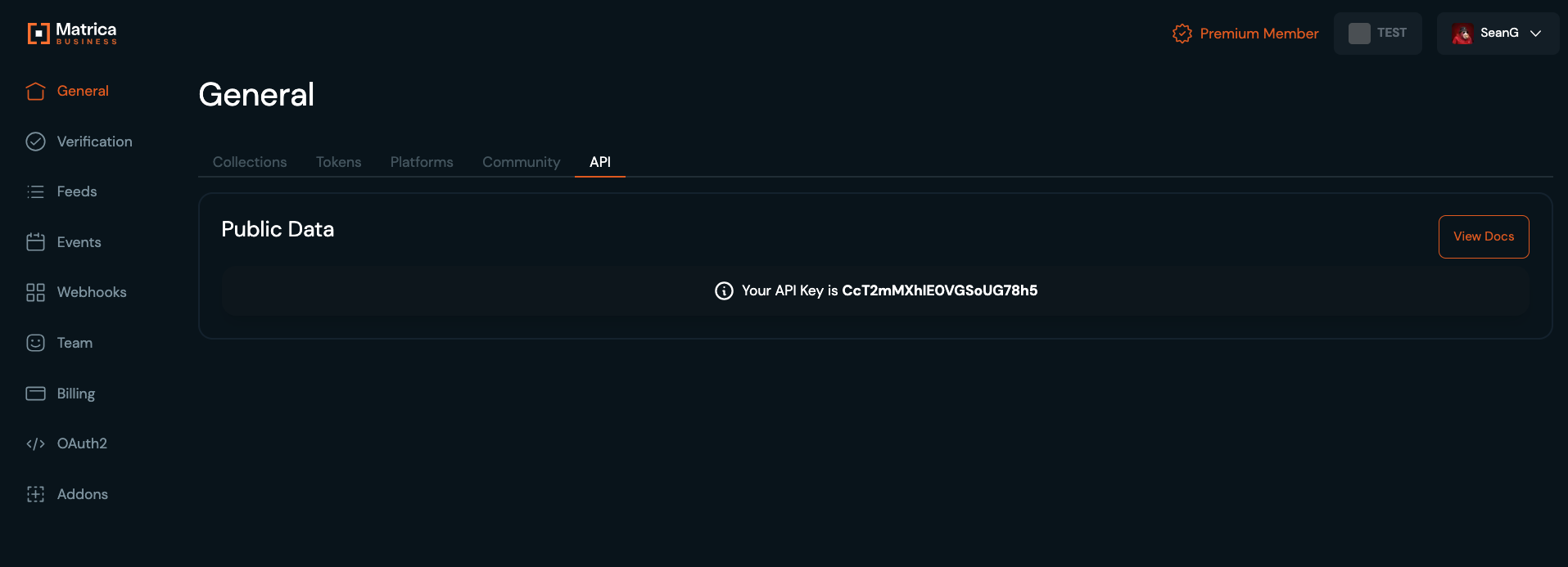
* API Access
* Premium Bot
* Co-Marketing with @MatricaLabs on X
* Advertisements - B2B and B2C ad-packages and promoted content
* Dedicated Developer Support

{% content-ref url="/pages/UtYdNf83JjhSGE5OfxQF" %}
[Matrica Connect Overview](/matrica-connect/matrica-connect-overview)
{% endcontent-ref %}

{% content-ref url="/pages/NhqsvVcxtRqGSkJiBF4D" %}
[API - Getting Started](/api-reference/api-getting-started)
{% endcontent-ref %}


# Matrica Connect Overview

Features of Matrica Connect

<figure><img src="https://2946875910-files.gitbook.io/~/files/v0/b/gitbook-x-prod.appspot.com/o/spaces%2FLywT3slSQ4GoAk6k17dV%2Fuploads%2FQUx3B3FebkBn1um36DbG%2FScreenshot%202024-10-10%20at%2011.24.40%E2%80%AFAM.png?alt=media&amp;token=67cce70e-d577-4b35-a875-18f765beda4a" alt=""><figcaption></figcaption></figure>

### Benefits

* Matrica Connect offers seamless user authentication and connection to platforms without signing messages
* Saves development cost of building & maintaining multi-chain wallet connections and implementing new standards
* Access cross-chain user blockchain data
* Access user social data
* Leverage Matrica's ecosystem of communities and collections
* Increases user-trust with the platform by abstracting the wallet connection layer

<figure><img src="https://2946875910-files.gitbook.io/~/files/v0/b/gitbook-x-prod.appspot.com/o/spaces%2FLywT3slSQ4GoAk6k17dV%2Fuploads%2FYitPMA8PuRWGa4xGDJoX%2FScreenshot%202025-04-23%20at%201.42.03%E2%80%AFPM.png?alt=media&amp;token=06658027-801d-4346-a27e-fa62487961db" alt=""><figcaption></figcaption></figure>


# Who's Building with Matrica Connect?

Overview of top clients and Use Cases of Matrica Connect from our Enterprise partners

<figure><img src="https://2946875910-files.gitbook.io/~/files/v0/b/gitbook-x-prod.appspot.com/o/spaces%2FLywT3slSQ4GoAk6k17dV%2Fuploads%2F5J2TIOSA8eDGqnDSZRjg%2FMatrica%20Connect%20Dark.png?alt=media&amp;token=9b26a2a6-80d7-4e9a-8ff2-6eb5387bf59d" alt=""><figcaption></figcaption></figure>

### Case Studies

Matrica Connect can power a variety of different apps and experiences in Web3:&#x20;

#### NFT Communities & Social

* <https://recognizer.monad.xyz/> - A recognition app for the Monad community that enables members to verify each other through a simple voting interface. Users authenticate via Matrica by connecting their Discord and EVM wallets, helping establish trust and credibility within the community.
* <https://portaltobitcoin.com/> - Portal to Bitcoin is the only custody-less solution for native Bitcoin to other chains. Ensuring a smooth and frictionless authentication, users earn badges for their holdings across chains through Matrica Connect.&#x20;
* <https://bananastand.monkedao.io/> - The main portal for Solana Monkey Business’ social experience, Banana Stand uses Matrica Connect to verify NFT ownership, granting exclusive access to holders. This ensures a secure and seamless login for community members to engage in a custom experience.
* &#x20;<https://dscvr.one/> - DSCVR, a Solana-based social platform, leverages Matrica Connect to pull NFT and social data (like Discord and Twitter) into streamlined user profiles. This enables access to gated social chats, creating community engagement with a unified experience.
* <https://www.konn3ct.io/> - Konn3ct, a cross-chain social platform, relies on Matrica Connect for 100% gated authentication. By verifying ownership of top community NFTs, users gain access to event chats, social groups, and a map-like experience to encourage community connectivity.

#### Gaming

* <https://lootloot.farm/> - LootLoot.Farm token-gates access to its Web3 game using Matrica Connect, detecting NFTs in user profiles to unlock features. By streamlining multi-wallet connections and social data transfers, it saves players time and eliminates in-game wallet signing hassles.
* <https://moonwalk.fit/> - Moonwalk uses Matrica Connect to create gamified walking competitions based on community NFT or token holdings. This allows members to compete in fun, health-focused challenges, boosting engagement within the community.
* <https://www.gamingbigbrain.gg/> - GamingBigBrain streamlines profile creation by pulling social data from Matrica Connect, then unlocks game access by detecting held NFTs. Players can use their favorite cross-chain NFTs as in-game avatars, enhancing personalization and immersion.

#### Analytics

* <https://www.assetdash.com/> - AssetDash builds a cross-chain portfolio tracker by connecting all wallets in a user’s Matrica profile. It also integrates social data from platforms like Twitter and Discord, delivering in-depth, personalized data displays for a complete picture of asset management.used to connect multiple wallets (portfolio manager)
* <https://nadradar.com/> - Nadradar offers a community-driven on-chain analytics dashboard for the Monad ecosystem. Using Matrica Connect, users can showcase platforms with the most prestigious ecosystem roles (nad) and identify holders of cross-ecosystem assets.

#### Pre-Sale & Whitelist

* <https://www.playsolana.com/> - Play Solana uses Matrica Connect to enable DePIN infrastructure claims, branding Solana gaming devices through community activations. Users unlock exclusive partner devices and skins by connecting their profiles, enhancing their gaming distribution experience.
* <https://www.hermans.club/> - Hermans Club gamified whitelist management with Matrica Connect, rewarding top holders of prestigious collections across chains with first-access spots. This drove over 110k+ website visits and 12k+ connections in days, fueling seamless launch traction.
* <https://shop.dogofbitcoin.com/> - Dog-Of-Bitcoin token-gates its plushie storefront with Matrica Connect, allowing Rune token and Ordinal holders to claim exclusive new releases and unlock discounts. This creates a seamless, rewarding shopping experience for their community.

**Matrica Connect in action:**

{% embed url="<https://www.youtube.com/watch?embeds_referring_euri=https://cdn.iframe.ly/&source_ve_path=MzY4NDIsMjg2NjY&themeRefresh=1&v=ctDKFWB7yRs>" %}


# What is OAuth2?

OAuth 2.0 is the industry-standard protocol for authorization. OAuth 2.0 focuses on client developer simplicity while providing specific authorization flows for applications.

## OAuth Roles <a href="#oauth-roles" id="oauth-roles"></a>

OAuth defines four roles:

* **Resource Owner**: The resource owner is the *user* who authorizes an *application* to access their account. The application’s access to the user’s account is limited to the scope of the authorization granted (e.g. read or write access)
* **Client**: The client is the *application* that wants to access the *user*’s account. Before it may do so, it must be authorized by the user, and the authorization must be validated by the API.
* **Resource Server**: The resource server hosts the protected user accounts.
* **Authorization Server**: The authorization server verifies the identity of the *user* then issues access tokens to the *application*.

## Implementation at Matrica

We have implemented some OAuth 2.1 specifications (see this [link](https://oauth.net/2.1/)) to have a more secured flow:

* PKCE is required for all OAuth clients using the authorization code flow
* Redirect URIs must be compared using exact string matching
* The Implicit grant (`response_type=token`) is omitted from this specification
* The Resource Owner Password Credentials grant is omitted from this specification
* Bearer token usage omits the use of bearer tokens in the query string of URIs

We will implement the newest standard once it comes out of draft.


# Create your application

Accessible through your Matrica Business Dashboard at <https://business.matrica.io/apis>, under the "OAuth2" tab.

Once you are onboarded as a community with Matrica, you will be able to create an application that will allow you to set up the OAuth 2.0 flow.

{% hint style="info" %}
We recommend using our NPM package for easy integration located at <https://www.npmjs.com/package/@matrica/oauth-sdk> (JS)
{% endhint %}

Your application can be set as "Public" or "Private". An application is considered "Public" if the flow is started from a public client (such as a mobile app or SPA) which cannot store any confidential data. A "Private" application will be issued a Client Secret which will be required on the authorization and token API calls for extra security.

Your application will have multiple fields related to the OAuth 2.0 flow:

* Client ID: should be considered public information.
* Client Secret: only if your app is set to "Private".
* Redirect URIs: you will need to set your callback URIs, localhost URIs won't be accepted.
* Scopes: the list of scopes that your application needs and will be asked to the user.

You will also be able to set up a name, description, image and a link to your ToS for your application. This data will be shown to the user on the Authorization screen after triggering the OAuth 2.0 flow.

## Scopes

You will need to define the scopes that your application needs. Keep in mind that the lowest amount of scopes you ask for, the most likely the user will accept the OAuth 2.0 authorization. For example, if you ask for their socials and your app only needs their NFTs to operate, the user might refuse to link their account to your application.

**Available scopes:**

* `profile`: Get the user profile information, including username, profile picture and banner, creation date
* `wallets`: Get the user 's wallet addresses. Will include cross-chain wallets when they will be available on Matrica (ETH, etc...).
* `nfts`: Get the user's NFTs. It's not equivalent to getting the wallets as the user could link multiple wallets without NFTs in them.
* `socials.discord`: Get the user's linked discord id.
* `socials.twitter`: Get the user's linked twitter id.
* `socials.telegram` : Get the user's linked telegram id.
* `email` : Get the user's **verified** email.

**Notes:**

* a minimum of one scope must be required by your app.
* if a scope is scheduled to be removed by Matrica, we will announce a deprecation warning beforehand.&#x20;
* more scopes might be added in the future.

### Button Design

<div><figure><img src="https://2946875910-files.gitbook.io/~/files/v0/b/gitbook-x-prod.appspot.com/o/spaces%2FLywT3slSQ4GoAk6k17dV%2Fuploads%2FSaQ0j3MtmOxxkaED6Uw8%2Fbtn_matrica_signin_dark.svg?alt=media&amp;token=7ed1992e-4c1e-4187-b712-d81ff1bd0f94" alt=""><figcaption></figcaption></figure> <figure><img src="https://2946875910-files.gitbook.io/~/files/v0/b/gitbook-x-prod.appspot.com/o/spaces%2FLywT3slSQ4GoAk6k17dV%2Fuploads%2FLdgupHMynNVBDZYKrfhu%2Fbtn_matrica_signin_light.svg?alt=media&amp;token=afaa7dfa-0bb7-4bdf-a1bc-85fa6fd2e3b1" alt=""><figcaption></figcaption></figure></div>


# Initial Redirect

This will trigger the OAuth 2.0 flow.

To start the OAuth 2.0 flow, you will need to redirect the user to `https://matrica.io/oauth2`.

Make sure to include the params below, url encoded as query string params.

**Required fields:**

* `client_id`: Your application Client ID.
* `response_type`: Must be set to `code`.
* `redirect_uri`: One of the URIs set in your application.
* `scope`: String representing the list of the scopes that your app is requesting, each scope must be separated by a space.
* `code_challenge`: PCKE code challenge.
* `code_challenge_method`: PKCE code challenge method. Must be set to `S256`.

Optional fields:

* `state`: **Highly recommended.** The `state` parameter is used by the application to store request-specific data and/or prevent CSRF attacks. More info [here](https://auth0.com/docs/secure/attack-protection/state-parameters).

Example of a redirect request:

`https://matrica.io/oauth2?client_id=123465&scope=profile&response_type=code&redirect_uri=https%3A%2F%2Fexample.com%2Fcallback&code_challenge=q1512316q&code_challenge_method=S256&state=x1561axa165`


# Retrieving the Access Token

### Getting the code

If the user has accepted the link, we will redirect the flow to your `redirect_uri` URI with two query string parameters:

* `code`: You will need the code to make an API call to retrieve the access token.
* `state`(optional): The `state` params that you passed in the previous redirect (if any).

**Note**: if the user has denied the request, we will redirect to your `redirect_uri` URI with the error `access_denied`. The code has a short expiration time (\~ 1minute).

### Getting the access token

Now that you have a valid code, you can make a request to  `POST https://api.matrica.io/oauth2/token`with these params:

* `grant_type` : Must be set to `authorization_code`
* `code` : The code that you received.
* `redirect_uri` : The callback redirect URI originally requested.
* `client_id` : Your application ID.
* `client_secret` (optional): Only if your application is set to "Private".
* `code_verifier` : PKCE code verifier.

{% hint style="info" %}
Content-Type must be `application/x-www-form-urlencoded`
{% endhint %}

If everything matches up, the API call will respond with this JSON object:

```json
{
    "access_token": "qwertyuio123456",
    "token_type": "Bearer",
    "refresh_token": "qwertyuiopasdfghjk",
    "expires_in": 3600,
    "scope": "profile"
}            
```

You can use the `access_token` to make calls to the OAuth 2.0 APIs (see [here](/matrica-connect/api-reference#user-data-requests)) and get the information you have access to (depending on the scopes).

### Refresh token

Store the `refresh_token` safely and use it to get a new `access_token` once it has expired by calling `POST https://api.matrica.io/oauth2/token` with these params:

* `refresh_token` : The refresh token.
* `grant_type` : Must be set to `refresh_token`.
* `client_id` : Your application ID.
* `client_secret` (optional): Only if your application is "Private".


# API Reference

## Authorization Requests

{% openapi src="/files/uJZNPtJ6QZbWy0fOOZxY" path="/authorize/" method="get" %}
[oauth2.json](https://2946875910-files.gitbook.io/~/files/v0/b/gitbook-x-prod.appspot.com/o/spaces%2FLywT3slSQ4GoAk6k17dV%2Fuploads%2F3oWVCt0SN3J0Dlmom8r3%2Foauth2.json?alt=media\&token=58d8e05f-ff32-426d-8a24-f0ce0b2bbb95)
{% endopenapi %}

{% openapi src="/files/3NaJK0aQKW8t81uEcwIP" path="/authorize/" method="post" %}
[oauth2.json](https://2946875910-files.gitbook.io/~/files/v0/b/gitbook-x-prod.appspot.com/o/spaces%2FLywT3slSQ4GoAk6k17dV%2Fuploads%2FSInEmwUP4t8OaER7Uoxj%2Foauth2.json?alt=media\&token=3c874826-1864-4b37-8b35-36aa8bdbc02f)
{% endopenapi %}

## Token Requests

{% hint style="info" %}
Content-Type must be `application/x-www-form-urlencoded`
{% endhint %}

{% openapi src="/files/O6BQVUrsgGv3QL26ClbP" path="/token/" method="post" %}
[oauth2.json](https://2946875910-files.gitbook.io/~/files/v0/b/gitbook-x-prod.appspot.com/o/spaces%2FLywT3slSQ4GoAk6k17dV%2Fuploads%2F5wH2numQpSE6WyNDpGWr%2Foauth2.json?alt=media\&token=b11a6ad2-e11e-4e1f-831b-75d6e33a497b)
{% endopenapi %}

{% openapi src="/files/uJZNPtJ6QZbWy0fOOZxY" path="/token/revoke" method="post" %}
[oauth2.json](https://2946875910-files.gitbook.io/~/files/v0/b/gitbook-x-prod.appspot.com/o/spaces%2FLywT3slSQ4GoAk6k17dV%2Fuploads%2F3oWVCt0SN3J0Dlmom8r3%2Foauth2.json?alt=media\&token=58d8e05f-ff32-426d-8a24-f0ce0b2bbb95)
{% endopenapi %}

## User data requests (v1, deprecated)

{% hint style="danger" %}
This will be deprecated, please use the V2 User APIs. [Click here](/matrica-connect/oauth2-api-reference-v2) to access the V2 docs.
{% endhint %}

{% hint style="info" %}
Use the user's OAuth2 access token to make these calls.

In the HTTP request header: `Authorization: Bearer xxxx` where `xxxx` is the access token
{% endhint %}

{% openapi src="/files/uJZNPtJ6QZbWy0fOOZxY" path="/user/profile" method="get" %}
[oauth2.json](https://2946875910-files.gitbook.io/~/files/v0/b/gitbook-x-prod.appspot.com/o/spaces%2FLywT3slSQ4GoAk6k17dV%2Fuploads%2F3oWVCt0SN3J0Dlmom8r3%2Foauth2.json?alt=media\&token=58d8e05f-ff32-426d-8a24-f0ce0b2bbb95)
{% endopenapi %}

{% openapi src="/files/uJZNPtJ6QZbWy0fOOZxY" path="/user/wallets" method="get" %}
[oauth2.json](https://2946875910-files.gitbook.io/~/files/v0/b/gitbook-x-prod.appspot.com/o/spaces%2FLywT3slSQ4GoAk6k17dV%2Fuploads%2F3oWVCt0SN3J0Dlmom8r3%2Foauth2.json?alt=media\&token=58d8e05f-ff32-426d-8a24-f0ce0b2bbb95)
{% endopenapi %}

{% openapi src="/files/uJZNPtJ6QZbWy0fOOZxY" path="/user/nfts" method="get" %}
[oauth2.json](https://2946875910-files.gitbook.io/~/files/v0/b/gitbook-x-prod.appspot.com/o/spaces%2FLywT3slSQ4GoAk6k17dV%2Fuploads%2F3oWVCt0SN3J0Dlmom8r3%2Foauth2.json?alt=media\&token=58d8e05f-ff32-426d-8a24-f0ce0b2bbb95)
{% endopenapi %}

## Get OAuth2 user verified email

<mark style="color:blue;">`GET`</mark> `https://api.matrica.io/oauth2/user/email`

Returns the user data including their verified email. If the user doesn't have a verified email. this will `null`.

{% tabs %}
{% tab title="200: OK User verified email or null" %}

{% endtab %}
{% endtabs %}

{% openapi src="/files/uJZNPtJ6QZbWy0fOOZxY" path="/user/discord" method="get" %}
[oauth2.json](https://2946875910-files.gitbook.io/~/files/v0/b/gitbook-x-prod.appspot.com/o/spaces%2FLywT3slSQ4GoAk6k17dV%2Fuploads%2F3oWVCt0SN3J0Dlmom8r3%2Foauth2.json?alt=media\&token=58d8e05f-ff32-426d-8a24-f0ce0b2bbb95)
{% endopenapi %}

{% openapi src="/files/uJZNPtJ6QZbWy0fOOZxY" path="/user/twitter" method="get" %}
[oauth2.json](https://2946875910-files.gitbook.io/~/files/v0/b/gitbook-x-prod.appspot.com/o/spaces%2FLywT3slSQ4GoAk6k17dV%2Fuploads%2F3oWVCt0SN3J0Dlmom8r3%2Foauth2.json?alt=media\&token=58d8e05f-ff32-426d-8a24-f0ce0b2bbb95)
{% endopenapi %}

## Get OAuth2 user telegram.

<mark style="color:blue;">`GET`</mark> `https://api.matrica.io/oauth2/user/telegram`

{% tabs %}
{% tab title="200: OK Returns the OAuth2 user telegram" %}

{% endtab %}
{% endtabs %}


# OAuth2 API Reference V2

{% hint style="info" %}
Use the user's OAuth2 access token to make these calls.

In the HTTP request header: `Authorization: Bearer xxxx` where `xxxx` is the access token
{% endhint %}

Full Swagger documentation can be found at <https://api.matrica.io/oauth2/docs>

NPM package (TS): <https://www.npmjs.com/package/@matrica/oauth-sdk>


# OAuth2UserV2

## GET /profile

> Get OAuth2 user profile.

```json
{"openapi":"3.0.0","info":{"title":"Matrica Labs OAuth 2.0 User API","version":"2.0.0"},"servers":[{"url":"/oauth2/v2/user","description":"OAuth 2.0 User API v2"}],"paths":{"/profile":{"get":{"responses":{"200":{"description":"Returns the OAuth2 user profile.","content":{"application/json":{"schema":{"type":"object","properties":{"profile":{"$ref":"#/components/schemas/UserProfileV2"}}}}}}},"tags":["OAuth2UserV2"],"summary":"Get OAuth2 user profile.","operationId":"getOAuth2UserProfileV2"}}},"components":{"schemas":{"UserProfileV2":{"type":"object","properties":{"name":{"type":"string"},"vanityURL":{"type":"string"},"pfp":{"type":"string"},"banner":{"type":"string"},"pfpNFT":{"type":"object","properties":{"id":{"type":"string"},"collection":{"type":"object","properties":{"id":{"type":"string"},"name":{"type":"string"}}}}}}}}}}
```

## GET /wallets

> Get OAuth2 user wallets.

```json
{"openapi":"3.0.0","info":{"title":"Matrica Labs OAuth 2.0 User API","version":"2.0.0"},"servers":[{"url":"/oauth2/v2/user","description":"OAuth 2.0 User API v2"}],"paths":{"/wallets":{"get":{"responses":{"200":{"description":"Returns the OAuth2 user wallets.","content":{"application/json":{"schema":{"$ref":"#/components/schemas/WalletsResponseV2"}}}}},"tags":["OAuth2UserV2"],"summary":"Get OAuth2 user wallets.","operationId":"getOAuth2UserWalletsV2"}}},"components":{"schemas":{"WalletsResponseV2":{"type":"object","properties":{"wallets":{"type":"array","items":{"type":"object","properties":{"id":{"type":"string"},"networkSymbol":{"type":"string"},"primaryWalletOn":{"type":"array","items":{"type":"string"}},"activeChains":{"type":"array","items":{"type":"string"}}}}}}}}}}
```

## GET /email

> Get OAuth2 user email.

```json
{"openapi":"3.0.0","info":{"title":"Matrica Labs OAuth 2.0 User API","version":"2.0.0"},"servers":[{"url":"/oauth2/v2/user","description":"OAuth 2.0 User API v2"}],"paths":{"/email":{"get":{"responses":{"200":{"description":"Returns the OAuth2 user email.","content":{"application/json":{"schema":{"$ref":"#/components/schemas/EmailResponseV2"}}}}},"tags":["OAuth2UserV2"],"summary":"Get OAuth2 user email.","operationId":"getOAuth2UserEmailV2"}}},"components":{"schemas":{"EmailResponseV2":{"type":"object","properties":{"email":{"type":"string"}}}}}}
```

## GET /twitter

> Get OAuth2 user twitter.

```json
{"openapi":"3.0.0","info":{"title":"Matrica Labs OAuth 2.0 User API","version":"2.0.0"},"servers":[{"url":"/oauth2/v2/user","description":"OAuth 2.0 User API v2"}],"paths":{"/twitter":{"get":{"responses":{"200":{"description":"Returns the OAuth2 user twitter.","content":{"application/json":{"schema":{"$ref":"#/components/schemas/TwitterResponseV2"}}}}},"tags":["OAuth2UserV2"],"summary":"Get OAuth2 user twitter.","operationId":"getOAuth2UserTwitterV2"}}},"components":{"schemas":{"TwitterResponseV2":{"type":"object","properties":{"twitter":{"oneOf":[{"$ref":"#/components/schemas/SocialAccountV2"},{"type":"null"}]}}},"SocialAccountV2":{"type":"object","properties":{"name":{"type":"string"},"externalId":{"type":"string"},"externalName":{"type":"string"}},"required":["name","externalId","externalName"]}}}}
```

## GET /discord

> Get OAuth2 user discord.

```json
{"openapi":"3.0.0","info":{"title":"Matrica Labs OAuth 2.0 User API","version":"2.0.0"},"servers":[{"url":"/oauth2/v2/user","description":"OAuth 2.0 User API v2"}],"paths":{"/discord":{"get":{"responses":{"200":{"description":"Returns the OAuth2 user discord.","content":{"application/json":{"schema":{"$ref":"#/components/schemas/DiscordResponseV2"}}}}},"tags":["OAuth2UserV2"],"summary":"Get OAuth2 user discord.","operationId":"getOAuth2UserDiscordV2"}}},"components":{"schemas":{"DiscordResponseV2":{"type":"object","properties":{"discord":{"oneOf":[{"$ref":"#/components/schemas/SocialAccountV2"},{"type":"null"}]}}},"SocialAccountV2":{"type":"object","properties":{"name":{"type":"string"},"externalId":{"type":"string"},"externalName":{"type":"string"}},"required":["name","externalId","externalName"]}}}}
```

## GET /telegram

> Get OAuth2 user telegram.

```json
{"openapi":"3.0.0","info":{"title":"Matrica Labs OAuth 2.0 User API","version":"2.0.0"},"servers":[{"url":"/oauth2/v2/user","description":"OAuth 2.0 User API v2"}],"paths":{"/telegram":{"get":{"responses":{"200":{"description":"Returns the OAuth2 user telegram.","content":{"application/json":{"schema":{"$ref":"#/components/schemas/TelegramResponseV2"}}}}},"tags":["OAuth2UserV2"],"summary":"Get OAuth2 user telegram.","operationId":"getOAuth2UserTelegramV2"}}},"components":{"schemas":{"TelegramResponseV2":{"type":"object","properties":{"telegram":{"oneOf":[{"$ref":"#/components/schemas/SocialAccountV2"},{"type":"null"}]}}},"SocialAccountV2":{"type":"object","properties":{"name":{"type":"string"},"externalId":{"type":"string"},"externalName":{"type":"string"}},"required":["name","externalId","externalName"]}}}}
```

## GET /roles

> Get OAuth2 user roles.

```json
{"openapi":"3.0.0","info":{"title":"Matrica Labs OAuth 2.0 User API","version":"2.0.0"},"servers":[{"url":"/oauth2/v2/user","description":"OAuth 2.0 User API v2"}],"paths":{"/roles":{"get":{"responses":{"200":{"description":"Returns the OAuth2 user roles.","content":{"application/json":{"schema":{"$ref":"#/components/schemas/RolesResponseV2"}}}}},"tags":["OAuth2UserV2"],"summary":"Get OAuth2 user roles.","operationId":"getOAuth2UserRolesV2"}}},"components":{"schemas":{"RolesResponseV2":{"type":"object","properties":{"roles":{"oneOf":[{"type":"array","items":{"$ref":"#/components/schemas/UserRoleV2"}},{"type":"null"}]}}},"UserRoleV2":{"type":"object","properties":{"id":{"type":"string"},"name":{"type":"string"},"guildId":{"type":"string"}}}}}}
```

## GET /nfts

> Get OAuth2 user NFTs with pagination.

```json
{"openapi":"3.0.0","info":{"title":"Matrica Labs OAuth 2.0 User API","version":"2.0.0"},"servers":[{"url":"/oauth2/v2/user","description":"OAuth 2.0 User API v2"}],"paths":{"/nfts":{"get":{"responses":{"200":{"description":"Returns a paginated list of the OAuth2 user NFTs.","content":{"application/json":{"schema":{"type":"array","items":{"type":"object","properties":{"id":{"type":"string"},"name":{"type":"string"},"image":{"type":"string"},"status":{"type":"string"},"networkSymbol":{"type":"string"},"isCompressed":{"type":"boolean"},"inscriptionNumber":{"type":"number","nullable":true},"ownerId":{"type":"string"},"collection":{"type":"object","properties":{"id":{"type":"string"},"name":{"type":"string"}}},"community":{"type":"object","properties":{"id":{"type":"string"},"name":{"type":"string"}}}}}}}}},"400":{"description":"Bad request."}},"tags":["OAuth2UserV2"],"summary":"Get OAuth2 user NFTs with pagination.","operationId":"getOAuth2UserNFTsV2","parameters":[{"in":"query","name":"nftId","schema":{"type":"string"}},{"in":"query","name":"collectionId","schema":{"type":"string","format":"uuid"}},{"in":"query","name":"networkSymbol","schema":{"type":"string"}}]}}}}
```

## GET /tokens

> Get OAuth2 user wallet tokens with pagination and filters.

```json
{"openapi":"3.0.0","info":{"title":"Matrica Labs OAuth 2.0 User API","version":"2.0.0"},"servers":[{"url":"/oauth2/v2/user","description":"OAuth 2.0 User API v2"}],"paths":{"/tokens":{"get":{"responses":{"200":{"description":"Returns a paginated list of the OAuth2 user wallet tokens.","content":{"application/json":{"schema":{"type":"array","items":{"type":"object","properties":{"id":{"type":"string"},"totalAmount":{"type":"number"},"amount":{"type":"number"},"stakedAmount":{"type":"number"},"walletId":{"type":"string"},"tokenId":{"type":"string"},"token":{"type":"object","properties":{"id":{"type":"string"},"name":{"type":"string"},"symbol":{"type":"string"},"networkSymbol":{"type":"string"}}}}}}}}},"400":{"description":"Bad request."}},"tags":["OAuth2UserV2"],"summary":"Get OAuth2 user wallet tokens with pagination and filters.","operationId":"getOAuth2UserTokensV2","parameters":[{"in":"query","name":"networkSymbol","schema":{"type":"string"}},{"in":"query","name":"tokenIds","schema":{"type":"array","maxLength":25}},{"in":"query","name":"minBalance","schema":{"type":"number"}}]}}}}
```

## GET /domains

> Get OAuth2 user domains with pagination and filters.

```json
{"openapi":"3.0.0","info":{"title":"Matrica Labs OAuth 2.0 User API","version":"2.0.0"},"servers":[{"url":"/oauth2/v2/user","description":"OAuth 2.0 User API v2"}],"paths":{"/domains":{"get":{"responses":{"200":{"description":"Returns a paginated list of the OAuth2 user domains.","content":{"application/json":{"schema":{"type":"array","items":{"type":"object","properties":{"key":{"type":"string"},"name":{"type":"string"},"extension":{"type":"string"},"owner":{"type":"object","properties":{"id":{"type":"string"},"networkSymbol":{"type":"string"}}}}}}}}},"400":{"description":"Bad request."}},"tags":["OAuth2UserV2"],"summary":"Get OAuth2 user domains with pagination and filters.","operationId":"getOAuth2UserDomainsV2","parameters":[{"in":"query","name":"extension","schema":{"type":"string"}},{"in":"query","name":"networkSymbol","schema":{"type":"string"}}]}}}}
```


# Models

## The RolesResponseV2 object

```json
{"openapi":"3.0.0","info":{"title":"Matrica Labs OAuth 2.0 User API","version":"2.0.0"},"components":{"schemas":{"RolesResponseV2":{"type":"object","properties":{"roles":{"oneOf":[{"type":"array","items":{"$ref":"#/components/schemas/UserRoleV2"}},{"type":"null"}]}}},"UserRoleV2":{"type":"object","properties":{"id":{"type":"string"},"name":{"type":"string"},"guildId":{"type":"string"}}}}}}
```

## The UserRoleV2 object

```json
{"openapi":"3.0.0","info":{"title":"Matrica Labs OAuth 2.0 User API","version":"2.0.0"},"components":{"schemas":{"UserRoleV2":{"type":"object","properties":{"id":{"type":"string"},"name":{"type":"string"},"guildId":{"type":"string"}}}}}}
```

## The TelegramResponseV2 object

```json
{"openapi":"3.0.0","info":{"title":"Matrica Labs OAuth 2.0 User API","version":"2.0.0"},"components":{"schemas":{"TelegramResponseV2":{"type":"object","properties":{"telegram":{"oneOf":[{"$ref":"#/components/schemas/SocialAccountV2"},{"type":"null"}]}}},"SocialAccountV2":{"type":"object","properties":{"name":{"type":"string"},"externalId":{"type":"string"},"externalName":{"type":"string"}},"required":["name","externalId","externalName"]}}}}
```

## The DiscordResponseV2 object

```json
{"openapi":"3.0.0","info":{"title":"Matrica Labs OAuth 2.0 User API","version":"2.0.0"},"components":{"schemas":{"DiscordResponseV2":{"type":"object","properties":{"discord":{"oneOf":[{"$ref":"#/components/schemas/SocialAccountV2"},{"type":"null"}]}}},"SocialAccountV2":{"type":"object","properties":{"name":{"type":"string"},"externalId":{"type":"string"},"externalName":{"type":"string"}},"required":["name","externalId","externalName"]}}}}
```

## The TwitterResponseV2 object

```json
{"openapi":"3.0.0","info":{"title":"Matrica Labs OAuth 2.0 User API","version":"2.0.0"},"components":{"schemas":{"TwitterResponseV2":{"type":"object","properties":{"twitter":{"oneOf":[{"$ref":"#/components/schemas/SocialAccountV2"},{"type":"null"}]}}},"SocialAccountV2":{"type":"object","properties":{"name":{"type":"string"},"externalId":{"type":"string"},"externalName":{"type":"string"}},"required":["name","externalId","externalName"]}}}}
```

## The SocialAccountV2 object

```json
{"openapi":"3.0.0","info":{"title":"Matrica Labs OAuth 2.0 User API","version":"2.0.0"},"components":{"schemas":{"SocialAccountV2":{"type":"object","properties":{"name":{"type":"string"},"externalId":{"type":"string"},"externalName":{"type":"string"}},"required":["name","externalId","externalName"]}}}}
```

## The WalletsResponseV2 object

```json
{"openapi":"3.0.0","info":{"title":"Matrica Labs OAuth 2.0 User API","version":"2.0.0"},"components":{"schemas":{"WalletsResponseV2":{"type":"object","properties":{"wallets":{"type":"array","items":{"type":"object","properties":{"id":{"type":"string"},"networkSymbol":{"type":"string"},"primaryWalletOn":{"type":"array","items":{"type":"string"}},"activeChains":{"type":"array","items":{"type":"string"}}}}}}}}}}
```

## The EmailResponseV2 object

```json
{"openapi":"3.0.0","info":{"title":"Matrica Labs OAuth 2.0 User API","version":"2.0.0"},"components":{"schemas":{"EmailResponseV2":{"type":"object","properties":{"email":{"type":"string"}}}}}}
```

## The UserProfileV2 object

```json
{"openapi":"3.0.0","info":{"title":"Matrica Labs OAuth 2.0 User API","version":"2.0.0"},"components":{"schemas":{"UserProfileV2":{"type":"object","properties":{"name":{"type":"string"},"vanityURL":{"type":"string"},"pfp":{"type":"string"},"banner":{"type":"string"},"pfpNFT":{"type":"object","properties":{"id":{"type":"string"},"collection":{"type":"object","properties":{"id":{"type":"string"},"name":{"type":"string"}}}}}}}}}}
```


# API - Getting Started

{% hint style="info" %}
If you want to request any kind of feature/new API, please reach out by raising a ticket on our discord at <https://discord.gg/matricalabs>
{% endhint %}

{% hint style="danger" %}
Some APIs will only work with Solana wallets.

If you notice any kind of bug or route not working properly, please raise a ticket in our discord server or group DM with your community and our team will help.
{% endhint %}

## Making a request

To make a request to our API, simply call:

`https://api.matrica.io/v1/{path}?apiKey={key}`

## Finding your API Key

You API key can be found under the the 'API' tab, under the "General" on the Matrica Business site.

<figure><img src="https://2946875910-files.gitbook.io/~/files/v0/b/gitbook-x-prod.appspot.com/o/spaces%2FLywT3slSQ4GoAk6k17dV%2Fuploads%2F478AZFCdVQvT9XcmMi2t%2Fgeneralapi.png?alt=media&amp;token=6d2ae7d0-23e0-4ff3-a1d5-0bf64d20117d" alt=""><figcaption></figcaption></figure>


# Feed

v1/feed

## Get Enterprise Feed

<mark style="color:blue;">`GET`</mark> `https://api.matrica.io/v1/feed`

Fetch feeds based on given parameters. This route is exclusive to Enterprise plans.

#### Query Parameters

| Name         | Type      | Description                                                                                            |
| ------------ | --------- | ------------------------------------------------------------------------------------------------------ |
| communityIds | string\[] | Array of community Ids. Feed will only include communities provided.                                   |
| type         | string    | Type of feed entry. ex) DISCORD, TWITTER                                                               |
| date         | string    | <p>Will only include the feed items starting from the specified date.</p><p></p><p>ISO format date</p> |
| skip         | number    | Pagination skip, default 0                                                                             |
| take         | number    | Pagination take, default 25                                                                            |


# User

/v1/user

## Get user

Returns a Matrica user by their username.

{% openapi src="/files/yZk0HZM5zgDLwFFZROhK" path="/user/{username}" method="get" %}
[openapi-api.json](https://2946875910-files.gitbook.io/~/files/v0/b/gitbook-x-prod.appspot.com/o/spaces%2FLywT3slSQ4GoAk6k17dV%2Fuploads%2F4JjlUa9i1SXbANP2Isfu%2Fopenapi-api.json?alt=media\&token=cff2c0a1-ca66-494f-bfaf-5b31ffc8a3e2)
{% endopenapi %}

Returns a Matrica user's profile.

## Get NFT Collection Counts for a User

Returns the count of NFTs a user owns in specific collections. This route is *Enterprise* only.

{% openapi src="/files/mBxh2t1IBkSwZlnuxWCq" path="/v1/user/{userId}/nft-collections" method="get" %}
[collection2.json](https://2946875910-files.gitbook.io/~/files/v0/b/gitbook-x-prod.appspot.com/o/spaces%2FLywT3slSQ4GoAk6k17dV%2Fuploads%2F0raKGxrvpK02vLQcXVsf%2Fcollection2.json?alt=media\&token=1a9f3c0c-2bed-483f-bfd0-35043bbefc3f)
{% endopenapi %}

{% openapi src="/files/2wNgLn9u2YEmYTYWGH5z" path="<https://api.matrica.io/v1/user/{userId}/pfp>" method="get" %}
[pfp.json](https://2946875910-files.gitbook.io/~/files/v0/b/gitbook-x-prod.appspot.com/o/spaces%2FLywT3slSQ4GoAk6k17dV%2Fuploads%2FqXSgTNkqhw8pwg2WOdbK%2Fpfp.json?alt=media\&token=1e1bad3e-fc6b-42d3-b3c4-eef8c540957e)
{% endopenapi %}


# Wallet

/v1/wallet

## Get wallet

Returns a Matrica user based on their wallet address.

{% openapi src="/files/yZk0HZM5zgDLwFFZROhK" path="/wallet/{walletId}" method="get" %}
[openapi-api.json](https://2946875910-files.gitbook.io/~/files/v0/b/gitbook-x-prod.appspot.com/o/spaces%2FLywT3slSQ4GoAk6k17dV%2Fuploads%2F4JjlUa9i1SXbANP2Isfu%2Fopenapi-api.json?alt=media\&token=cff2c0a1-ca66-494f-bfaf-5b31ffc8a3e2)
{% endopenapi %}

## Get wallet collections

Returns all collections owned by a wallet.

{% openapi src="/files/yZk0HZM5zgDLwFFZROhK" path="/wallet/{walletId}/collections" method="get" %}
[openapi-api.json](https://2946875910-files.gitbook.io/~/files/v0/b/gitbook-x-prod.appspot.com/o/spaces%2FLywT3slSQ4GoAk6k17dV%2Fuploads%2F4JjlUa9i1SXbANP2Isfu%2Fopenapi-api.json?alt=media\&token=cff2c0a1-ca66-494f-bfaf-5b31ffc8a3e2)
{% endopenapi %}

## Get wallet NFTs

Returns all NFTs, including staked and listed, held by a wallet.

{% openapi src="/files/yZk0HZM5zgDLwFFZROhK" path="/wallet/{walletId}/nfts" method="get" %}
[openapi-api.json](https://2946875910-files.gitbook.io/~/files/v0/b/gitbook-x-prod.appspot.com/o/spaces%2FLywT3slSQ4GoAk6k17dV%2Fuploads%2F4JjlUa9i1SXbANP2Isfu%2Fopenapi-api.json?alt=media\&token=cff2c0a1-ca66-494f-bfaf-5b31ffc8a3e2)
{% endopenapi %}


# Events

/v1/wallet

## Get Events

## Get all Events data

<mark style="color:blue;">`GET`</mark> `https://api.matrica.io/v1/event`

Returns the community's events.

#### Query Parameters

| Name | Type   | Description                 |
| ---- | ------ | --------------------------- |
| skip | number | Pagination skip, default 0  |
| take | number | Pagination take, default 25 |

{% tabs %}
{% tab title="200: OK All Events data" %}

{% endtab %}
{% endtabs %}

## Get Event

## Get Event data

<mark style="color:blue;">`GET`</mark> `https://api.matrica.io/v1/event/:eventId`

Get a community event.

#### Path Parameters

| Name                                      | Type   | Description     |
| ----------------------------------------- | ------ | --------------- |
| eventId<mark style="color:red;">\*</mark> | string | Event ID (uuid) |

{% tabs %}
{% tab title="200: OK Event data" %}

{% endtab %}

{% tab title="400: Bad Request Event not found" %}

{% endtab %}
{% endtabs %}

## Issue a Ticket to User for the Event

## Issue a Ticket

<mark style="color:green;">`POST`</mark> `https://api.matrica.io/v1/event/:eventId/member/:userId`

Issues a ticket for the user and the event

#### Path Parameters

| Name                                      | Type   | Description            |
| ----------------------------------------- | ------ | ---------------------- |
| eventId<mark style="color:red;">\*</mark> | string | Event ID (uuid)        |
| userId<mark style="color:red;">\*</mark>  | string | Matrica User ID (uuid) |

#### Request Body

| Name                                           | Type   | Description                                           |
| ---------------------------------------------- | ------ | ----------------------------------------------------- |
| issuer<mark style="color:red;">\*</mark>       | string | Identification of the issuer (usually your app name)  |
| issuerExternalId                               | string | Optional ID that your want to associate with your app |
| ticketTierId<mark style="color:red;">\*</mark> | string | Ticket tier that this ticket will be issued for       |

{% tabs %}
{% tab title="200: OK Ticket data" %}

{% endtab %}

{% tab title="400: Bad Request Event not found." %}

{% endtab %}

{% tab title="400: Bad Request User not found." %}

{% endtab %}

{% tab title="400: Bad Request User was blocked by the community to join this event." %}

{% endtab %}
{% endtabs %}

## Revoke/Void a Ticket

## Void a Ticket

<mark style="color:purple;">`PATCH`</mark> `https://api.matrica.io/v1/event/:eventId/ticket/:ticketId`

Revokes/Voids a ticket for a user/event

#### Path Parameters

| Name                                       | Type   | Description      |
| ------------------------------------------ | ------ | ---------------- |
| eventId<mark style="color:red;">\*</mark>  | string | Event ID (uuid)  |
| ticketId<mark style="color:red;">\*</mark> | string | Ticket ID (uuid) |

#### Request Body

| Name     | Type    | Description                                   |
| -------- | ------- | --------------------------------------------- |
| refunded | boolean | If the ticket is voided because it's refunded |

{% tabs %}
{% tab title="200: OK Voided Ticket" %}

{% endtab %}

{% tab title="400: Bad Request Event not found." %}

{% endtab %}

{% tab title="400: Bad Request Ticket not found." %}

{% endtab %}
{% endtabs %}


# NFT

/v1/nft

## Get NFT

Returns an NFT by its mint address.

{% openapi src="/files/Va5uwo774tVLdGPB4WFx" path="/nft/{nftId}" method="get" %}
[openapi-api.json](https://2946875910-files.gitbook.io/~/files/v0/b/gitbook-x-prod.appspot.com/o/spaces%2FLywT3slSQ4GoAk6k17dV%2Fuploads%2Ffftve2zbXZ74wUToXwyN%2Fopenapi-api.json?alt=media\&token=5d905f38-5d43-4e4c-8c64-a7e8a3fad848)
{% endopenapi %}

## Get NFT Royalty

Returns the royalty paid status on the last sale of an NFT. Return type is either `true, false, or NO_DATA.`

{% openapi src="/files/Va5uwo774tVLdGPB4WFx" path="/nft/{nftId}/royalty" method="get" %}
[openapi-api.json](https://2946875910-files.gitbook.io/~/files/v0/b/gitbook-x-prod.appspot.com/o/spaces%2FLywT3slSQ4GoAk6k17dV%2Fuploads%2Ffftve2zbXZ74wUToXwyN%2Fopenapi-api.json?alt=media\&token=5d905f38-5d43-4e4c-8c64-a7e8a3fad848)
{% endopenapi %}

## Refresh a NFT

<mark style="color:blue;">`GET`</mark> `https://api.matrica.io/v1/nft/{nftId}/refresh`

Updates the metadata of the NFT

#### Path Parameters

| Name                                    | Type   | Description |
| --------------------------------------- | ------ | ----------- |
| nftId<mark style="color:red;">\*</mark> | string | NFT id      |

{% tabs %}
{% tab title="200: OK NFT has been refreshed" %}

{% endtab %}
{% endtabs %}


# Snapshot

/v1/snapshot

## Get snapshot

Returns all wallets that have the given role Discord role.

{% openapi src="/files/yZk0HZM5zgDLwFFZROhK" path="/snapshot/role/{roleId}" method="get" %}
[openapi-api.json](https://2946875910-files.gitbook.io/~/files/v0/b/gitbook-x-prod.appspot.com/o/spaces%2FLywT3slSQ4GoAk6k17dV%2Fuploads%2F4JjlUa9i1SXbANP2Isfu%2Fopenapi-api.json?alt=media\&token=cff2c0a1-ca66-494f-bfaf-5b31ffc8a3e2)
{% endopenapi %}


# Onboard

## Onboard Community

Creates a community application

#### Example input

{% hint style="info" %}
{ \
&#x20;    "name": "Secret Project", \
&#x20;    "wallet": "DVB14R1a4UxMDwzbu5rbKtSQPsBXRo1tLYXN3BTmqx25", \
&#x20;    "twitter": "<https://twitter.com/tranquil2600>", \
&#x20;    "discordId": "773212334674250518",\
&#x20;    "collection":{\
&#x20;         "name":"test",\
&#x20;         "tokenList":\["9Qqp7F6hz3ozNLz8zp6Dd7fUfiSqiG6wYH6pNiFxFBu3"]\
&#x20;    }, \
&#x20;    "platformId": "0327947f-046a-4062-bff4-885d11708132" \
}
{% endhint %}


# Search

Allows one to search for collections. Can be used by users to search for a specific collection on your website.

{% openapi src="/files/6cV1V7zaJnTHcfcc7VhT" path="<https://api.matrica.io/v1/search>" method="get" %}
[search.json](https://2946875910-files.gitbook.io/~/files/v0/b/gitbook-x-prod.appspot.com/o/spaces%2FLywT3slSQ4GoAk6k17dV%2Fuploads%2FP7t0BxpCZeZ02AC4rhMw%2Fsearch.json?alt=media\&token=69958f99-096b-4cec-984c-0936b0e3efe7)
{% endopenapi %}


# Collection

{% openapi src="/files/6cV1V7zaJnTHcfcc7VhT" path="<https://api.matrica.io/v1/collection>" method="get" %}
[search.json](https://2946875910-files.gitbook.io/~/files/v0/b/gitbook-x-prod.appspot.com/o/spaces%2FLywT3slSQ4GoAk6k17dV%2Fuploads%2FP7t0BxpCZeZ02AC4rhMw%2Fsearch.json?alt=media\&token=69958f99-096b-4cec-984c-0936b0e3efe7)
{% endopenapi %}

{% openapi src="/files/6cV1V7zaJnTHcfcc7VhT" path="<https://api.matrica.io/v1/collection/nft/{nftId}>" method="get" %}
[search.json](https://2946875910-files.gitbook.io/~/files/v0/b/gitbook-x-prod.appspot.com/o/spaces%2FLywT3slSQ4GoAk6k17dV%2Fuploads%2FP7t0BxpCZeZ02AC4rhMw%2Fsearch.json?alt=media\&token=69958f99-096b-4cec-984c-0936b0e3efe7)
{% endopenapi %}